If you are planning to build a new PC or breathe new life into an aging laptop, upgrading your storage is arguably the single most impactful change you can make. Gone are the days of the noisy, slow mechanical Hard Disk Drive (HDD). Today, the battleground is strictly between two heavyweights: the reliable SATA SSD and the lightning-fast NVMe M.2 SSD.
But with technical jargon like “PCIe lanes” and “throughput” thrown around, choosing the right drive can be confusing. According to a recent guide by Tom’s Hardware, the gap between these two technologies is closing in price but widening in performance. Let’s dive into the details to help you decide which drive deserves a spot in your rig.
Understanding the Contenders: What’s the Difference?
Before we look at the numbers, it is crucial to understand that we are comparing two different things: an interface (SATA) and a protocol/form factor combination (NVMe M.2).
-
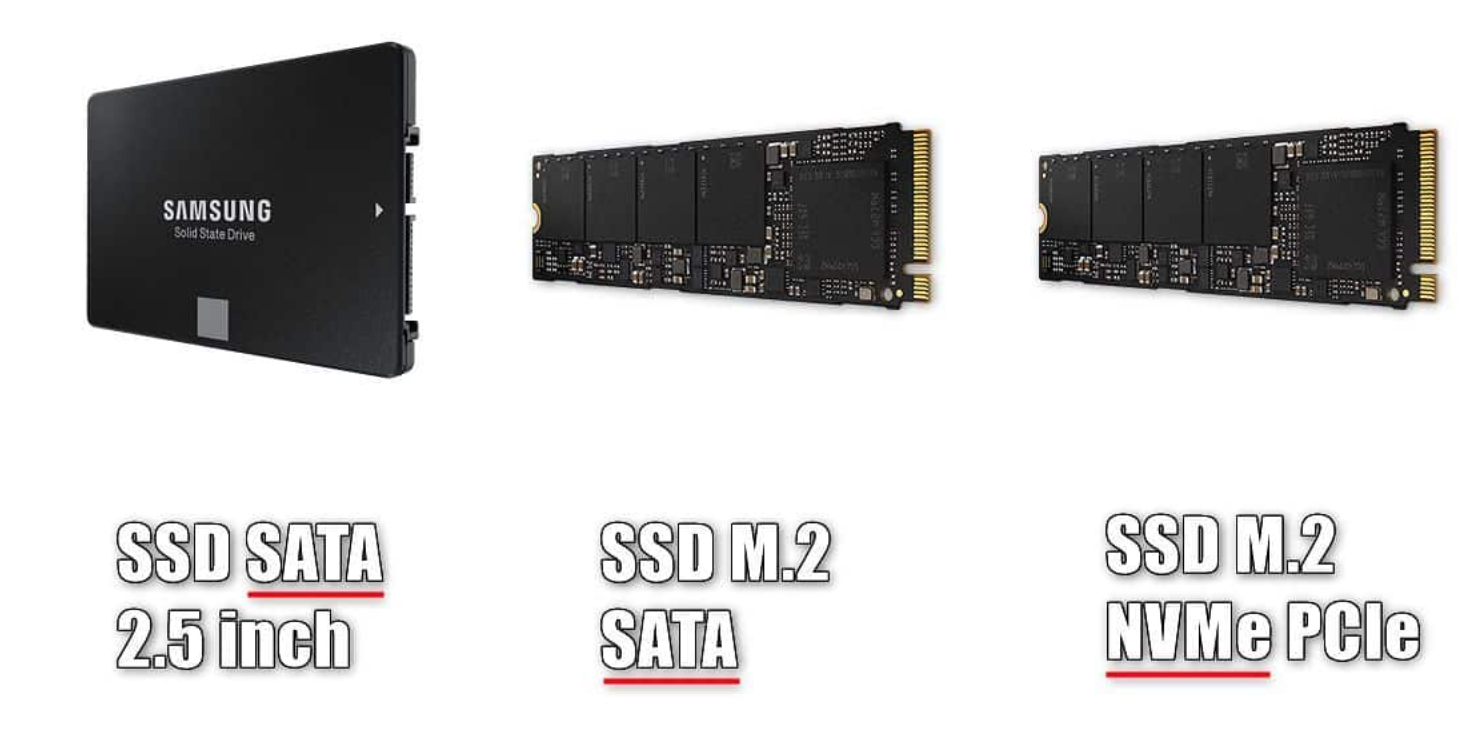
SATA SSD (Serial ATA): This is the “older” technology, though still very capable. It usually comes in a 2.5-inch boxy form factor that looks like a small laptop hard drive. It connects to your motherboard via a cable.
-
NVMe M.2 (Non-Volatile Memory Express): This is the modern standard. It is a small, stick-like drive (about the size of a stick of gum) that plugs directly into the motherboard. It uses the PCIe interface—the same high-bandwidth lane your graphics card uses.
Think of it this way: SATA is like a robust delivery truck driving on a single-lane road. It carries a lot, but traffic limits its speed. NVMe is a race car on a multi-lane superhighway; it can move data much faster because there is no traffic congestion.
Performance Breakdown: The Need for Speed
When discussing NVMe M.2 vs SATA SSD, performance is usually the deciding factor for power users.
1. Read/Write Speeds
The standard SATA III interface is capped at a theoretical maximum of 600 MB/s. Most real-world SATA drives top out around 550 MB/s for read and write speeds.
In contrast, NVMe drives utilize the PCIe generation bandwidth.
-
PCIe Gen 3.0 NVMe: Up to 3,500 MB/s.
-
PCIe Gen 4.0 NVMe: Up to 7,500 MB/s.
-
PCIe Gen 5.0 NVMe: Surpassing 10,000 MB/s.
As PC Gamer notes in their hardware reviews, while the jump from an HDD to a SATA SSD is monumental (5x faster), the jump from SATA to NVMe is mathematically massive (up to 15x faster), even if it feels slightly less dramatic in everyday browsing.
2. Latency and IOPS
NVMe technology was designed specifically for flash storage, whereas SATA was originally designed for spinning disks. This means NVMe has drastically lower latency. For content creators editing 4K video or transferring massive files, the NVMe drive processes commands significantly faster than its SATA counterpart.
The Price Factor: Is the Premium Worth It?
Historically, NVMe drives were luxury items. However, market trends have shifted. According to market analysis from TechRadar, the price gap has narrowed significantly.
-
Budget Tier: You can often find entry-level NVMe drives for roughly the same price as premium SATA SSDs.
-
High-End Tier: The fastest Gen 4 and Gen 5 NVMe drives still command a high price, often double the cost per gigabyte compared to standard drives.
If you are on a strict budget, a SATA SSD offers the lowest cost per terabyte. However, for just $10 or $20 more, an entry-level NVMe drive offers vastly superior potential, making it the better value proposition for most users.
Real-World Scenarios: Which Should You Buy?
To make this easier, let’s look at specific user cases:
-
The Gamer: Modern games are massive. While frame rates won’t change much, load times will. With new technologies like DirectStorage coming to Windows, games will soon rely heavily on NVMe speeds to load assets instantly. Winner: NVMe M.2.
-
The Office Worker: If your day involves Excel, web browsing, and email, a SATA SSD is perfectly adequate. You likely won’t notice the split-second difference in booting up Word. Winner: SATA SSD (or budget NVMe).
-
The Content Creator: For video editors and 3D renderers, time is money. Scrubbing through a high-bitrate timeline requires massive bandwidth. Winner: High-Performance NVMe.
Quick Comparison Table
| Feature | SATA SSD | NVMe M.2 SSD |
| Max Speed | ~560 MB/s | 3,500 – 12,000+ MB/s |
| Connection | SATA Cable | M.2 Slot (PCIe) |
| Form Factor | 2.5-inch or M.2 | M.2 Stick |
| Price | Affordable | Moderate to High |
| Best For | Mass storage, older PCs | OS boot drive, Gaming, Editing |
Conclusion
The battle of NVMe M.2 vs SATA SSD ultimately comes down to your motherboard’s compatibility and your specific needs. If you are building a PC in 2024 or beyond, going with an NVMe drive as your primary boot drive is the logical choice due to the diminishing price difference and superior performance. However, SATA SSDs remain excellent, cost-effective solutions for secondary storage drives to hold your photo libraries and backups.
Check your motherboard manual, set your budget, and enjoy the speed boost!
Frequently Asked Questions (FAQ)
Q: Can I put an NVMe M.2 drive in any computer?
A: No. You need a motherboard with an M.2 slot that specifically supports NVMe (PCIe) keys. Some older M.2 slots only support SATA M.2 drives.
Q: Is NVMe noticeably faster than SATA for gaming?
A: Currently, load times are faster by a few seconds, but it isn’t instant. However, future games utilizing DirectStorage will require NVMe drives to run validly.
Q: Do NVMe drives get hot?
A: Yes. Because of their high speeds, they can generate significant heat. Many high-end NVMe drives come with heatsinks, and many motherboards include thermal guards for the M.2 slots.
Q: Can I mix SATA and NVMe drives?
A: Absolutely. A popular configuration is using a 1TB NVMe drive for Windows and games, and a cheaper 2TB SATA SSD for storing data and files.
-
-
-
-
-
-

-