Affordable High Traffic Hosting Solutions With Headless WordPress
8 September 2026
4 menit membaca
Executive Summary (Direct Answer Box):
Eliminate Origin Load: Offloading the frontend to Cloudflare Pages allows WordPress servers to only process data when content is published, reducing CPU and MySQL origin database usage by over 95%.
Massive Scale Traffic Resilience: All static pages are served directly from Cloudflare’s Edge Network in hundreds of cities worldwide, ensuring sites are free from 508 Resource Limit Reached or 504 Gateway Timeout errors.
Real Budget Efficiency: Site managers can maintain the cheapest shared hosting package without the obligation to upgrade to a high-cost VPS or Dedicated Server.
Unexpected visitor spikes are often a nightmare for news portal managers, personal blogs, and startup media websites. Based on testing by the lidahtekno.com editorial team, the majority of WordPress sites based on cheap shared hosting immediately crash when they receive more than 200 concurrent users. The primary cause isn’t content quality, but rather the conventional monolithic architecture that forces the server to execute heavy PHP scripts and database queries simultaneously with every page request.
This condition triggers CloudLinux LVE restrictions, running out of physical RAM allocation, and finally displays a white screen that says Error Establishing a Database Connection. However, breaking the bank to rent a high-performance VPS isn’t the only solution. Through a paradigm shift to a headless architecture combined with Cloudflare Pages and the WordPress REST API, minimal server specifications can now seamlessly serve tens of thousands of simultaneous readers.
Why Does Shared Hosting Always Fail When Facing Traffic Spikes?
In a standard WordPress configuration, every time a visitor opens a post, the Apache or LiteSpeed web server must invoke the PHP interpreter. This interpreter is responsible for reading theme files, executing dozens of plugins, querying dozens of lines of data into a MariaDB/MySQL database, and then compiling it into HTML code before sending it back to the user’s browser.
This dynamic mechanism places a significant burden on the processor (vCPU) and disk I/O. On budget hosting plans, providers limit CPU allocation to just 1 core or even a small number of threads. Once a link goes viral on social media, the queue of entry processes is immediately overflowed. Built-in caching plugins often fail to mitigate the load if the cache configuration expires or if a cache event occurs. cache stampede.
The Headless WordPress Concept: Separating the Editorial Kitchen from the Reader Showcase
Adapted from an evaluation of modern web infrastructure, headless (decoupled CMS) architecture dissects WordPress functionality into two independent entities:
Backend (WordPress Core): Hosted on cheap hosting or even a private subdomain, its sole function is to serve as an administration panel for authors to draft, upload images, and publish articles. This content is made publicly available in raw data form via the WordPress REST API (/wp-json/wp/v2/posts).
Frontend (Cloudflare Pages): It’s the visual interface that readers see. The frontend is built using a static site generator (SSG) like Astro, Next.js, or a static HTML export system. These static files are hosted for free on Cloudflare Pages’ serverless infrastructure.
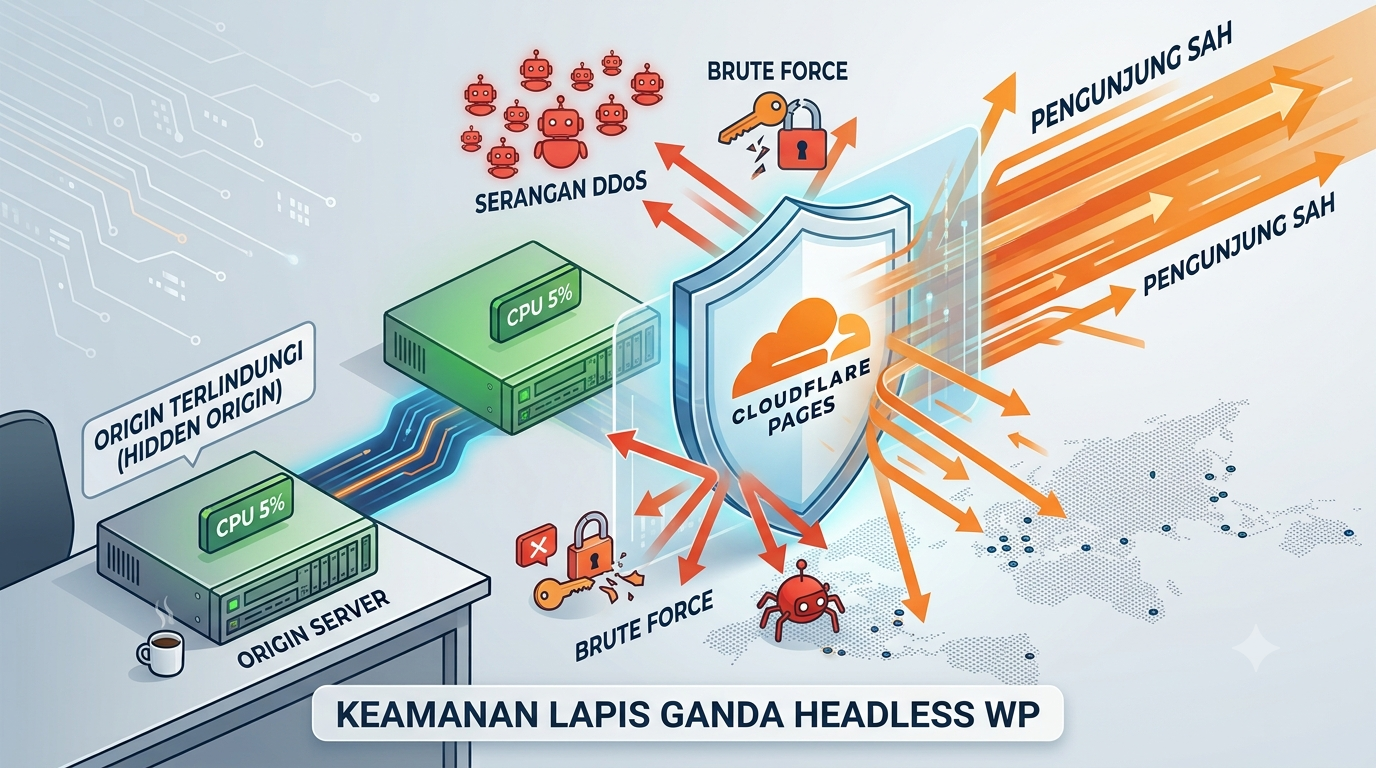
When thousands of visitors flock to your site, they don’t touch the shared hosting server where WordPress is installed. Visitor requests are handled entirely by Cloudflare’s edge network. Your cheap hosting server remains operational with near-zero CPU load.
Comparison Table: Standard WordPress vs Cloudflare Headless WordPress
Assessment Parameters
Monolithic WordPress (Standard Hosting)
WordPress Headless + Cloudflare Pages
Origin CPU Consumption
Very high; fluctuates depending on the number of active readers.
Zero when accessed by the reader; only active when generating content.
Nearly unlimited capacity following Cloudflare’s global throughput.
Global TTFB Speed
300 ms – 1,200 ms (depending on the physical location of the hosting server).
15 ms – 50 ms (served from the data center closest to the visitor).
Database Security & Admin
Vulnerable to direct wp-login and XML-RPC brute force attacks.
Very secure; the origin server can be hidden behind an IP whitelist.
Infrastructure Cost Estimate
Swollen (needs VPS/Dedicated upgrade of hundreds of thousands/month).
Minimalist (just the cheapest shared hosting + Cloudflare free tier).
Quick Guide: Headless WordPress and Cloudflare Configuration Schema
Building a headless system doesn’t always have to involve writing thousands of lines of code from scratch. The technical team at lidahtekno.com has summarized the most efficient implementation path for digital publishers:
Enable and Secure WordPress REST API: Ensure the REST API endpoint is active and accessible. Hide the admin login directory using Cloudflare Access protection or HTTP Basic Authentication to prevent malicious bots from scanning your origin server.
Define Frontend Generator: Take advantage of a modern, content-friendly framework like Astro or Gatsby that pulls data from WordPress’ REST API endpoints, or use a Static Site Generator plugin (like Simply Static) to export your article database into a set of pure static HTML, CSS, and JS files.
Connect Repository to Cloudflare Pages: Link your frontend project’s GitHub or GitLab repository to the Cloudflare Pages dashboard. Specify the build command and output folder for automatic compilation.
Implement Build Webhook: Install a webhook trigger plugin in WordPress. Every time you press the “Publish” button or edit an old article, WordPress will send a signal to Cloudflare Pages to rebuild the page within seconds.
Redirect Primary Domain DNS: Point your public domain directly to a Cloudflare Pages CNAME. The shared hosting server is now completely isolated and acts solely as a content generator behind the scenes.
Limitations to Note
While this solution is a budget-saving solution amidst the onslaught of millions of readers, a static headless architecture has some trade-offs. Sites that rely heavily on real-time features like WordPress’s built-in comments section, complex dynamic forms, or WooCommerce shopping carts require separate management through third-party API integrations (e.g., SaaS-based comment services or Cloudflare Workers’ serverless functions).
For information media sites, regional news portals, gadget reviews, and corporate blogs that rely on fast text and image presentation, a headless architecture based on Cloudflare Pages is the most rational breakthrough. You’re no longer forced to dig deep into your pockets for a high-performance server just to prevent your site from crashing during peak traffic times.
LidahTekno.com is supported by Google Adsense advertising to provide content for you.Please consider disabling AdBlocker or adding us to your whitelist so we can continue providing the best technology information and tips.Thank you for your support!