
How to Track Location Through Google Account

Advances in digital technology have presented various features that are very helpful in everyday life, one of which is the ability to track someone’s location through a Google account. For users who rely on Google services such as Gmail or Maps, this feature can be used to find out the position of the device or other people with their consent. In this article, we will discuss how to track location through a Google account, as well as some effective methods of using email and gmail.
What is Location Tracking Through Google Accounts?
Google provides a variety of tools that make it easy for users to track the location of their device. One of the most popular services is google#atfp_close_translate_span# find my device, which serves to track your phone, tablet, or other device connected to your Google account. This service is very helpful especially in emergency situations such as losing a device or wanting to monitor the whereabouts of someone who has given permission to be tracked.
However, it’s not just Google Find My Device that can be used. Through Gmail Or an email related to a Google account, there are several steps that can be followed to find out the location of a device. This is a handy solution that leverages the Google ecosystem, including Gmail, Maps, and other Google security features.
How to Track Location Through Google Account
Google has a very efficient tracking system, especially for devices connected to your Google account. Here are some easy steps to track location using a Google account.
1. Using Google Find My Device
Google Find My Device is a feature specifically designed to track Android devices. This lets you find the location of your phone, tablet, or smartwatch connected to your Google account. Here are the steps to track the device using this service:
- Login to Google Account
- Visit the website google#atfp_close_translate_span# find my device Or open the app on another device.
- Sign in using a Google account that is connected to a lost device.
- Find the location of the device
- Once logged in, Google will try to find your device. If the device is connected to the Internet and the location is active, you will see a map showing the last position of the device.
- You can also play sound, lock the device, or delete data if the device cannot be found.
- Real-time tracking
- If the device is still connected, you can track it in real-time. However, if your phone is off or has no internet connection, Google will display the last detected location.
Note: This feature only works if the missing device has an active location and your Google account is still connected to the device.
2. How to track via Gmail email
In addition to using Google Find My Device, you can also take advantage of Gmail or the email address connected to the device you want to track. Through Gmail, you can check your login history or other information that can provide device location instructions. Here are the steps:
- Open Gmail
- Login to account Gmail you on another device.
- Check login activity
- At the bottom right of the Gmail inbox, you will find an option “Details” or “Account Details”. Click the option to see all your account login activity.
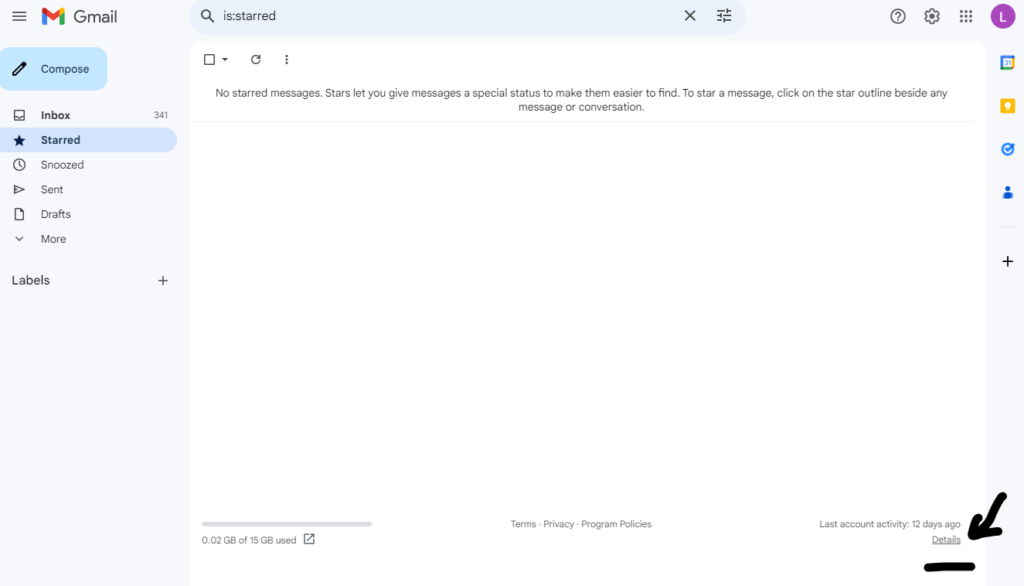
- At the bottom right of the Gmail inbox, you will find an option “Details” or “Account Details”. Click the option to see all your account login activity.
- View the last login location
- Gmail will display the IP address of the device that recently logged into your account. From that IP address, you can locate the device using the IP search tool on the internet.
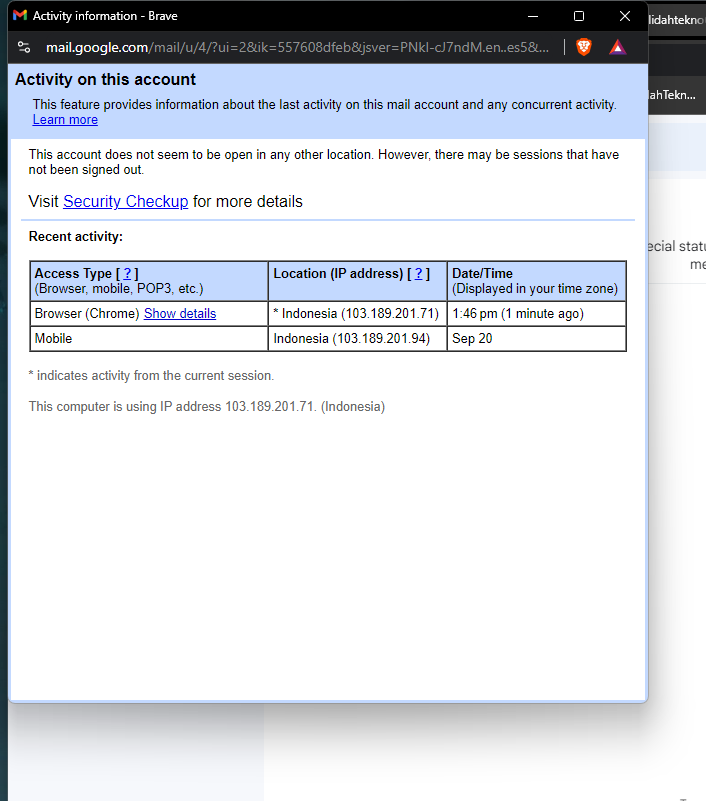
- Gmail will display the IP address of the device that recently logged into your account. From that IP address, you can locate the device using the IP search tool on the internet.
- Using the Gmail tracking feature
- If the device you are looking for is still connected to your Gmail account, you can use the login data as a reference for the location of the lost device.


3. How to Check Location Through Google Timeline
As part of the Google ecosystem, Google Maps stores a lot of information that can be used to track the location of the device. One way that is often used is to use Google Timeline, which records the travel history of the device connected to your Google account.


- Access Google Timeline
- Open timeline.google.com#atfp_close_translate_span# on another device.
- Sign in with a Google account that is connected to a lost device.
- View Location History
- On the Timeline page, you can see the history of the location of the device connected to your Google account.
- Select the date you want to check to see the device’s journey on that day.
- Find the current location
- If your device has an enabled location history, Google Timeline can show you the last location it detected.
Note: This feature will only work if the location setting on the device you want to track is enabled and the device is connected to your Google account.
4. Track Gmail Locations Directly
Tracking the location of Gmail can also be done using the application Google Maps with features share location. This is useful if you want to monitor the location of someone who already gives location sharing access via Gmail or Google Maps.
- Open Google Maps
- Open the Google Maps app and sign in with your Google account.
- Enable the location sharing feature
- In the main menu of Google Maps, select share location.
- Add the email address of the person you want to track (of course, the person must agree to share your location with you).
- Track real-time location
- Once the location sharing is enabled, you can see the person’s real-time position on Google Maps.

5. Track the location of the device via email notification
Google often sends email notifications when there is a login activity in your account from a new device or an unusual location. If you receive an email notification of this kind, you can use that information to track the location of the device. Here are the steps:
- Check email notifications
- Open your Gmail inbox and check if there is an email from Google that tells you there is suspicious login activity.
- Use IP address information
- The email usually contains the IP address and general location of the device that is logged into your account. You can use the IP address to find the location of the device.
Security Tips When Tracking Devices
In the process of tracking the device, maintaining the security of personal data remains a top priority. Here are some tips to keep your account safe while tracking locations:
- Always use two-factor authentication (2FA): Enable two-step verification in your Google account to prevent unauthorized access.
- Keep location privacy: Just share your location with trusted people and avoid public sharing location.
- Logout from unknown device: If you see any suspicious activity, immediately log out of a device you don’t recognize via Google account settings.
Conclusion
Tracking locations via Google, Gmail, or Email accounts is one effective way that can be done quickly and easily, especially when your device is lost. By utilizing services such as Google Find My Device, Google Timeline, and the location sharing feature on Google Maps, you can find lost devices or monitor someone’s location in real-time with their permission. Don’t forget to always maintain account security by activating security features such as two-factor authentication and routinely checking suspicious login activities.
Through this guide, you can master various ways to track the location of your device or other person with a Google account. Google’s advanced technology can help you feel more secure and minimize the risk of losing your device.


