What is the Difference Between Core i3, i5, and i7?
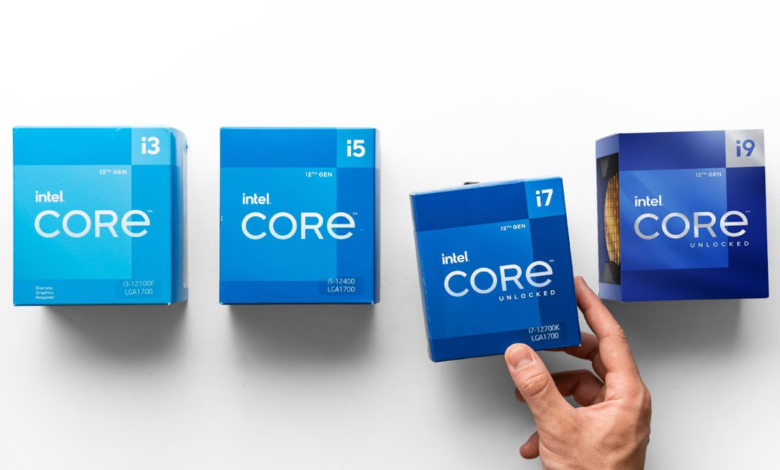
Buying a new computer or upgrading an old one can often feel like navigating a maze without a map. You look at the spec sheet, and there it is: the processor. It is the brain of your computer, but the naming scheme—Core i3, Core i5, and Core i7—can be baffling. Is an i7 always necessary? Is an i3 too slow for modern tasks?
The short answer is that the numbers represent “good, better, and best” within a specific generation. However, the nuance lies in what you actually plan to do with your machine.
Understanding the Intel Hierarchy
To put it simply, think of these processors like car engines. An i3 is your reliable economy sedan, an i5 is a sportier everyday car, and the i7 is a high-performance vehicle designed for enthusiasts.
Intel Core i3: The Budget-Friendly Workhorse
For many users, the Intel Core i3 is the unsung hero of the lineup. It is designed for basic computing tasks. If your daily routine involves web browsing, checking emails, working on Microsoft Office documents (Word, Excel), and streaming Netflix, the Core i3 is more than capable.
According to reviews from PCMag, modern Core i3 processors have advanced significantly, often boasting quad-core performance that rivals older i5 models. They are generally more energy-efficient, which translates to longer battery life in laptops. However, they typically lack “Turbo Boost” headroom compared to their bigger brothers, meaning they might struggle if you try to edit 4K video or play heavy 3D games.
Intel Core i5: The Jack of All Trades
The Intel Core i5 is arguably the most popular choice for mainstream users and gamers. It sits comfortably in the “sweet spot” of price and performance. These chips generally feature more cores than the i3 and utilize Turbo Boost technology, which allows the processor to run faster when needed.
For gamers, the i5 is often the recommended standard. As noted in various hardware guides by Tom’s Hardware, most modern games rely heavily on the graphics card (GPU), meaning a solid i5 won’t bottleneck your performance, saving you money to spend on a better GPU. It handles multitasking beautifully—so you can game, voice chat on Discord, and have a browser open simultaneously without lag.
Intel Core i7: For Power Users and Enthusiasts
If you hate waiting for progress bars, the Intel Core i7 is for you. This tier is designed for heavy multitasking, content creation, and high-end gaming. These processors usually have the highest clock speeds, the most cores, and the largest cache memory.
Professionals who use Adobe Premiere, AutoCAD, or do heavy code compiling will see a tangible time difference using an i7. TechRadar reports often highlight that while an i7 might be overkill for just browsing the web, it is essential for users who render 3D animation or edit high-resolution photos.
Key Technologies That Define the Difference
To truly understand the difference between Core i3, i5, and i7, we need to look at three technical pillars: Cores, Hyper-Threading, and Cache.
Cores and Threads: A “core” is like a worker in a factory. An i3 might have 4 workers, while an i7 might have 12 or more. Hyper-threading allows one worker to use two hands effectively (handling two streams of data at once). Generally, i7s have the most cores and threads, allowing them to handle massive workloads.
Turbo Boost: This is Intel’s terminology for automatically increasing the speed of the processor when the task demands it. i5 and i7 chips are aggressive with this, spiking their speeds high to crunch data quickly.
Cache Size: Think of cache as a scratchpad on the processor’s desk. The larger the cache, the less frequently the CPU has to fetch data from the system’s main RAM (which is slower). i7 processors have the largest cache, making repetitive tasks distinctively snappy.
Comparison at a Glance
Here is a simplified breakdown to help you decide which fits your lifestyle:
| Feature | Core i3 | Core i5 | Core i7 |
| Best For | Students, Office work, Browsing | Gamers, Multitaskers, Content Consumption | Video Editors, Data Scientists, Hardcore Gamers |
| Performance | Good / Basic | Very Good / Balanced | Excellent / High-End |
| Multitasking | Low to Medium | Medium to High | High |
| Price Point | Budget ($) | Mid-Range ($$) | Premium ($$$) |
| Battery Life | Excellent | Good | Average (High power consumption) |
A Critical Note on “Generations”
There is a catch that often tricks buyers: the Generation.
Important: A newer generation i3 can sometimes outperform an older generation i7.
For example, a 13th Gen Intel Core i3 is likely faster and more efficient than a 7th Gen Core i7. When comparing, always check the model number (e.g., i5-13600K vs i7-8700K). The first one or two digits after the hyphen indicate the generation. As reported by CNET, buying the latest generation is usually more important for future-proofing your PC than simply buying the highest tier from an old stock.
Frequently Asked Questions (FAQ)
Q: Do I need an i7 for gaming?
A: generally, no. Most games are GPU-dependent. An i5 is usually sufficient for high-end gaming. You should only consider an i7 if you are streaming your gameplay to Twitch or YouTube while playing.
Q: Which is better for a laptop battery?
A: Usually, the Core i3 or lower-power versions of the i5 (often ending in ‘U’ or ‘P’) offer the best battery life because they consume less power and generate less heat.
Q: Can I upgrade from an i3 to an i7 later?
A: On a desktop PC, yes, provided your motherboard supports the specific generation of the new chip. On laptops, the processor is almost always soldered to the board, so you cannot upgrade it later.
Conclusion
Choosing between an Intel Core i3, i5, and i7 comes down to understanding your own workflow. Don’t overspend on an i7 if you only browse the web, but don’t bottleneck your video editing career with an i3.
Choose i3 for budget builds and office work.
Choose i5 for the best balance of gaming and versatility.
Choose i7 for maximum performance and professional creation.
By matching the processor to your actual needs, you ensure a smooth computing experience without wasting money on power you’ll never use.