how to mute the phone wa

PCalls from unknown numbers are often a source of distraction and concern for WhatsApp users. However, the news is good for WhatsApp users, because this instant messaging application has introduced a new feature for user privacy by automatically mute the WA phone from an unknown number.
This feature is expected to provide a safer and more comfortable user experience. In this article, we will discuss in more detail about this new feature and how it works.
Security and convenience in WhatsApp calls
WhatsApp is always committed to increasing the security and convenience of users in communicating through its application. With the increasing number of reports of unwanted calls or frauds using unknown numbers, WhatsApp feels the need to present a solution that can protect users from such distractions.
Get to know new features: Automatically mute calls from unknown numbers
This new feature introduced by WhatsApp has the ability to automatically mute incoming calls from unknown numbers. When a user receives a call from a number that is not in their contact list, this feature will mute or mute the call and prevent it from disturbing the user.
How does this feature work?
Mute automatic feature calls from this unknown number use a smart mechanism to recognize numbers that are not registered in the user’s contact list. Every time there is an incoming call, WhatsApp will check whether the number is included in the contact list or not. If the number is unknown, this feature will take steps to mute the call.
Advantages of using this feature
With this feature, WhatsApp users will experience a number of significant benefits. Here are some of the advantages of using the automatic stop calling feature from unknown numbers:
1. Protection from unwanted calls
Users no longer need to worry or be disturbed by the sound of calls from unknown numbers. This feature provides protection automatically, so that users can focus on other important activities and are not disturbed by unwanted calls.
2. More secure user experience
With this feature, WhatsApp is trying to increase the level of user security in communicating. Users can feel more secure and protected from the potential threat of fraud or unwanted calls.


Steps and how to mute the phone wa
To enable the automatic Mute call feature of an unknown number, the user can follow these steps:
1. Open the WhatsApp app on your device and go to Settings

2. Go to the Privacy column


3. Select Call
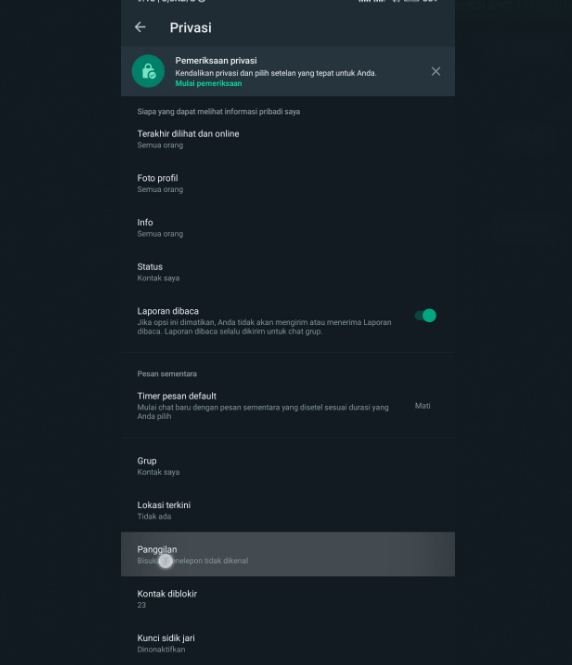

4. Enable Unknown Caller Sites Option


After following the steps above, the automatic call feature will be silent without sound will be active, and users can enjoy the benefits of this feature.
Related questions about How to Mute Phone Wa
Apakah fitur ini berlaku untuk semua jenis panggilan?
Yes, this feature applies to voice and video calls.Apakah fitur ini dapat dinonaktifkan?
Yes, users can reset these settings at any time via the settings option in the WhatsApp application.Apakah fitur ini mempengaruhi panggilan dari nomor yang tidak ada di daftar kontak?
This feature will mute all calls from numbers that are not in the contact list. Users can still see the history of incoming calls from the number.
With the feature of automatic silence calls from unknown numbers, WhatsApp brings user security and convenience to a higher level. Users can enjoy a more secure communication experience and are free from unwanted calls. Activate this feature and enjoy more secure and convenient use of WhatsApp!