ASUS ExpertBook Ultra and Firmware Security in the AI Era

Data Protection on a Laptop: Not Just Antivirus
For many office workers, data protection on laptops is usually synonymous with antivirus or security systems in software. However, cyber threats have now developed and are starting to target parts of devices that users rarely realize, including BIOS and firmware.
For information, the BIOS and firmware can be likened to a “initial system” that helps the laptop work the first time it is turned on. Because it is the basic part of the device, this area also plays an important role in running various systems on a laptop.
According to Rifan Fernando, Field Application Engineer Lead ASUS Indonesia, this section is now starting to become the target of attacks because work laptops are increasingly being used to access important company data and systems. “Working laptops are no longer only used for typing documents or online meetings. Many companies are starting to rely on work tools to access important data to running AI-based systems,” explained Rifan.
Therefore, the security of work devices is now an increasingly important concern for the company. However, according to Rifan, many companies are still more focused on protecting the operating system or antivirus than the basic parts of devices such as firmware. “Many organizations focus on protecting the operating system, but forget that firmware is the main foundation of computing devices,” he said.
According to him, when the BIOS or firmware is successfully infiltrated, the perpetrator can even get access before the operating system runs. Rifan explained, attacks targeting firmware can also be more difficult to handle than ordinary malware. This is because the attack can survive even though the operating system has been reinstalled or the storage media is replaced. “If the foundation of the device is not safe, then the protection of the software on it will also be less effective,” he added.
ASUS presents BIOS Recovery for additional protection
Seeing the change in the threat, ASUS presents a layered security approach through the ASUS ExpertGuardian platform which is applied to the ASUS ExpertBook Ultra. One of the features presented is ASUS BIOS Recovery which is designed to help restore the system in the event of BIOS damage.
According to Rifan, BIOS damage can trigger operational disruptions to hamper work productivity. “Many people think BIOS corruption is just an ordinary technical problem,” he said. In fact, according to Rifan, firmware damage can cause big downtime and have an impact on company activities. “If the main device has a problem, work activities can also be disrupted,” said Rifan.
Rifan explained, ASUS BIOS Recovery is designed to detect BIOS damage when the laptop is turned on. If the system finds a fault indication, the device can perform a recovery using a securely stored system backup. The technology is also designed to help detect suspicious system changes on the device.


ASUS also includes a hardware-based backup mechanism through the ASUS SPU Security Processor so that the recovery process is not easily manipulated by irresponsible parties. “The recovery system must also be safe,” said Rifan. According to him, if the firmware backup can be modified, the system recovery process will no longer be effective.
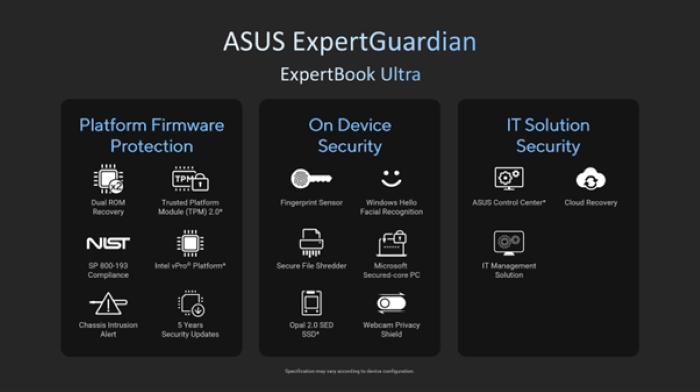
ASUS ExpertGuardian on ExpertBook Ultra brings various device protection features and data security for modern work needs. (doc. asus)
Rifan assessed that automatic BIOS recovery technology will be increasingly needed in the future, especially when the use of AI begins to increase the complexity of digital threats. In addition to providing device protection features, ASUS also provides long-term security update support on the ExpertBook Ultra.
ExpertBook Ultra comes with support for up to five years Security Updates, something that Rifan according to is still often ignored on premium laptops. “Enterprise requires stability and a long lifecycle. Business laptops are not devices that are changed every year,” he added.
In addition to presenting BIOS Recovery, ASUS ExpertBook Ultra also brings a number of other security features such as Microsoft Secured-Core PC support, Intel vPro Platform, TPM 2.0, to firmware protection according to NIST SP 800-193 security standards. ASUS also embed features such as fingerprint sensor, webcam privacy shield, secure file shredder, to OPAL 2.0 sd sd to help maintain user data security.
According to Rifan, this approach is in line with the zero trust architecture trend that many global companies have started to implement. “Now the device should not be trusted immediately just because it is on the company’s internal network,” he explained. Therefore, according to Rifan, every device needs to be kept safe before being used to access the company’s system.
In addition to security, the ASUS ExpertBook Ultra is also designed to support modern work needs with a lightweight design, OLED screen, Wi-Fi 7 support, and AI capabilities through an NPU of up to 50 tops. In the midst of work activities that are now increasingly relying on digital devices, laptop security is becoming increasingly important to the company. Not only to support daily work, but also to help keep important data and systems safe.
“In the future, enterprise laptops are not just about fast performance or thin design. The most important thing is how the device can stay safe and ready to face the digital threat that continues to grow,” concluded Rifan.