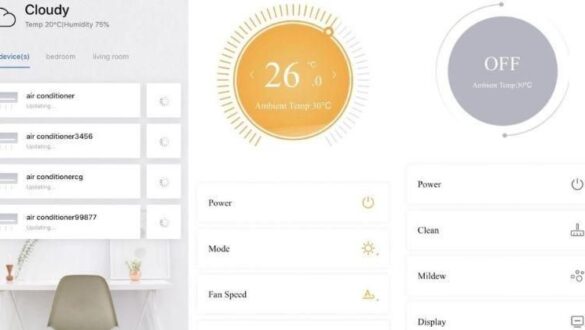
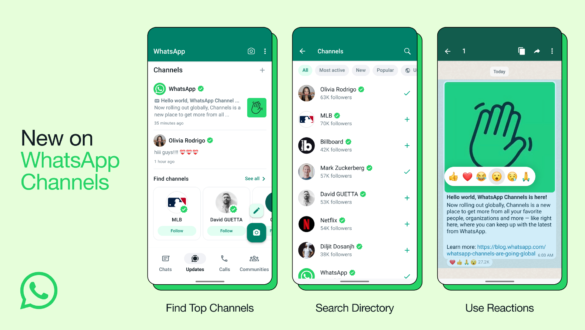
The tab bar is

FThe tab bar feature is one of the important innovations that brings convenience to its users. Not just a visual addition, the tab bar has changed the way we interact with applications, whether on desktop, tablet, or smartphone. This article will discuss in depth about the tab bar is? From understanding, functions, to how these features have a major impact on productivity and user experience.
What is a tab bar?
The tab bar is a feature that allows users to open multiple windows or documents in one application interface. This feature is usually at the top of the application, in the form of a series of tab titles that can be clicked to move between one document or window with another. The tab bar concept was first introduced to web browsers, but has now been widely used in various other applications, including word processors, spreadsheets, code editors, and more.
The tab bar is basically designed to optimize the workspace on the screen by reducing the need to open multiple application windows simultaneously. This is very useful for users who often work with multiple documents or data simultaneously.
A brief history of using tab bars
The tab bar first appeared in the world of web browsers in the late 1990s. Opera browser was one of the first to introduce this concept in 2000, followed by other browsers such as Firefox and Google Chrome. Before the tab bar, the user must open several browser windows to access several websites at once, which often causes the desktop to become full and unruly.

With the tab bar, users can easily move between websites without having to open multiple windows. This feature is quickly becoming popular and adopted by many other applications, both on desktop and mobile platforms.
tab bar functions and benefits
The tab bar offers a significant number of benefits, especially in terms of productivity and efficiency. Here are some of the main functions and benefits of the tab bar:
Save screen space
- With the tab bar, the user does not need to open multiple windows to work with some documents or applications. All can be accessed in one window by simply clicking on the desired tab. This is very helpful especially for users with small screens or who work on laptops.
increase productivity
- The ability to move between documents or windows quickly without having to minimize or maximize other windows makes the workflow faster and more efficient. The tab bar allows the user to stay focused on the task being done without being distracted by the number of open windows.
Reduces clutter on the desktop
- Before the tab bar was introduced, working with multiple windows often caused the desktop to become cluttered. The tab bar helps reduce this clutter by bringing together all documents or windows in one application.
Supports multitasking
- This feature allows users to multitask more easily. For example, when working on multiple documents in Microsoft Word or Excel, users can easily move between documents by simply clicking the tab, without having to close another document.
Ease of access and navigation
- The tab bar makes it easy to access and navigate between documents or applications. With just one click, users can move from one task to another, which is very useful in situations where time is invaluable.
tab bar in various apps
The tab bar is now widely used in various applications, not only limited to web browsers. Here are some apps that take advantage of the tab bar feature effectively:


Web browser
- As mentioned earlier, the web browser is a pioneer in the use of the tab bar. All modern browsers such as Google#atfp_close_translate_span# chrome, Mozilla Firefox, Microsoft Edge, and Safari use tab bars to make it easier for users to access several websites at once. This is one of the main reasons why tab bars are becoming very popular.
word processor
- Word processing applications such as Microsoft Word and Google Docs have also started to adopt tab bars to make it easier for users to manage multiple documents simultaneously. Users can open multiple documents in one window and move between documents easily.
Code Editor
- For developers, code editors such as Visual Studio Code, Sublime Text, and Atom use tab bars to facilitate the management of multiple code files. Users can open multiple code files in one window and move between files quickly.
spreadsheet
- Spreadsheet apps like Microsoft Excel and Google Sheets also take advantage of the tab bar, allowing users to open multiple worksheets in a single window. This is very helpful in analyzing the data spread across several worksheets.
Creative application
- Applications such as Adobe Photoshop and Illustrator use tab bars to facilitate the management of multiple projects or image files in a single window. This is very helpful for designers who often work with multiple files simultaneously.
The impact of the tab bar on the user experience
The use of the tab bar has had a significant impact on the user experience. With the tab bar, users can work more efficiently, more organized, and more focused. Here are some of the positive impacts of the tab bar on the user experience:
More comfortable user experience
- With the tab bar, users can work more comfortably without the hassle of opening and closing multiple windows. This helps reduce stress and increase job satisfaction.
time savings
- The tab bar helps save time that is usually wasted to move between windows. With just one click, users can move from one document to another quickly.
Improved work efficiency
- The ease of access and navigation offered by the tab bar makes the workflow more efficient. Users can complete tasks faster and more on time.
Focus increase
- With the tab bar, the user can stay focused on the task that is being done without being distracted by the number of open windows. This is very helpful in increasing productivity and quality of work.
Challenges and limitations of tab bars
While the tab bar offers many benefits, there are some challenges and limitations to note:
Overload tab
- One of the biggest challenges in using tab bars is the tendency to open too many tabs at once. This can lead to tab overload, where users feel overwhelmed by the large number of open tabs, which can ultimately reduce productivity.
memory usage
- Opening multiple tabs at the same time can affect device memory usage. This is especially a problem on devices with low specs, where too many tabs can cause app performance to be slow or even crash.
Difficult navigation
- While the tab bar makes it easy to navigate between documents or windows, too many open tabs can make navigation difficult. Users may have trouble finding the desired tab, especially if the tabs are not labeled clear.
how to optimize the use of tab bars
To make the use of tab bars more effective, here are some tips to follow:
Manage Tabs Wisely
- Don’t open too many tabs at once. Close the tabs that are no longer used to avoid tab overload and keep the application performance optimal.
Use extensions or plugins
- Some web browsers and other applications provide extensions or plugins to help manage tabs better. For example, an extension that can save tabs to reopen later, or extensions that can group tabs by category.
Take advantage of the tab group features
- Some web browsers and other applications offer tab group features that allow users to group related tabs into a single group. This makes it easy to navigate and keeps the tabbed display tidy.
Use keyboard shortcuts
- Many applications provide keyboard shortcuts to move between tabs quickly. Take advantage of these shortcuts to increase efficiency and speed up workflows.
Cover
The tab bar is a feature that has revolutionized the way we use the application, from web browsers to word processors and code editors. With the tab bar, we can work more efficiently, more organized, and more focused. Although there are some challenges in its use, with proper management, tab bars can be a very powerful tool in increasing productivity and work comfort. Therefore, it is important for us to understand how to use the tab bar optimally in order to take advantage of all the benefits it offers.
If you want to optimize your work experience, start by making use of the tab bar wisely and smartly. Remember, the key is good management to avoid tab overload and keep app performance optimal.
FAQ about tab bar
What is a tab bar?
The tab bar is a feature that allows users to open multiple windows or documents in one application interface. This feature is usually at the top of the application, in the form of a series of tab titles that can be clicked to move between one document or window with another.
What are the main benefits of tab bars?
The main benefits of tab bar include saving screen space, increasing productivity, reducing clutter on the desktop, supporting multitasking, and easy access and navigation between documents or applications.
How to manage tab bar to stay efficient?
To manage tab bars efficiently, avoid opening too many tabs at once, using extensions or plugins to manage tabs, make use of tab group features if available, and use keyboard shortcuts to move between tabs quickly.
Does the tab bar affect app performance?
Yes, opening too many tabs at once can affect device memory usage and application performance, especially on low-spec devices. Therefore, it is important to manage the tabs wisely.
Do all apps support tab bar?
Not all apps support tab bars, but this feature is increasingly being adopted by various apps, including web browsers, word processors, code editors, and creative apps like Adobe Photoshop.
With a good understanding of the tab bar and how to manage it, you can significantly increase your productivity and work comfort.