Difference between DDR4 and DDR5: innovation in RAM technology

RAM memory technology continues to evolve to support the increasingly high computing needs. Two technologies that are often compared are DDR4 and DDR5. This article will discuss difference between ddr4 and ddr5, Maximum RAM DDR4 and DDR5, and sample device type for ddr5. Come on, see more!
difference between ddr4 and ddr5
DDR4 (Double Data Rate 4) is a RAM technology that has been widely used since its release in 2014. DDR5, or Double Data Rate 5, is the next generation that brings significant improvements in performance and efficiency. Here are some key differences between DDR4 and DDR5:
data transfer speed
- DDR4: DDR4 data transfer rates range from 1600 to 3200 MT/s (mega transfers per second).
- DDR5: DDR5 offers higher data transfer speeds, ranging from 4800 to 8400 mt/s, with the potential to reach even higher speeds as technology develops.
capacity and density
- DDR4: DDR4 RAM module capacity generally ranges from 4GB to 32GB per module.
- DDR5: DDR5 allows larger capacity per module, ranging from 8GB to 128GB. This allows devices with high memory requirements, such as servers and workstations, to get more optimal performance.
power consumption
- DDR4: DDR4 operates at a voltage of 1.2V.
- DDR5: DDR5 has a lower operating voltage, which is 1.1V, which helps reduce power consumption and increase energy efficiency.
architecture and efficiency
- DDR4: Each DDR4 module has 16 memory banks organized in 4 Group Banks.
- DDR5: DDR5 increased the number of banks to 32 with 8 bank groups. This allows DDR5 to handle more data in parallel, improving efficiency and performance.
latency
- DDR4: latency or delay in DDR4 is generally in the range of Cl15 to Cl19.
- DDR5: Although DDR5 has a higher speed, the latency may initially be slightly higher than DDR4 (CL30 or more), but the increase in bandwidth is more than enough to compensate for this difference.
Maximum RAM DDR4 and DDR5
The maximum RAM capacity that can be used in a system is highly dependent on the RAM technology used as well as support from the motherboard and processor. Here is an overview of the maximum RAM capacity for DDR4 and DDR5:
DDR4
- Desktop PC: Generally supports up to 128GB of RAM using 4 DIMM slots, each with a capacity of 32GB.
- Laptop: usually supports up to 64GB of RAM, with 2 SODIMM slots each with a capacity of 32GB.
- Server: Can support up to 1.5TB of RAM or more, depending on the number of slots and the type of processor used.
DDR5
- Desktop PC: Expected to support up to 256GB of RAM, using 4 DIMM slots, each with a capacity of 64GB.
- Laptop: will likely support up to 128GB of RAM, with 2 SODIMM slots each with a capacity of 64GB.
- Server: It is estimated that it supports much larger capacity, up to 2TB or more, along with the development of technology and support from new server platforms.
| Features | DDR4 | DDR5 |
|---|---|---|
| data transfer speed | 1600 – 3200 MT/s | 4800 – 8400 MT/s |
| module capacity | 4GB – 32GB | 8GB – 128GB |
| operating voltage | 1.2V | 1.1V |
| Number of Banks | 16 Banks (4 Bank Groups) | 32 Banks (8 Bank Group) |
| latency | CL15 – CL19 | Cl30 or more |
| energy efficiency | less efficient than DDR5 | More efficient |
| Maximum capacity (desktop) | up to 128GB | up to 256GB |
| Maximum capacity (laptop) | up to 64GB | up to 128GB |
| Maximum capacity (server) | Up to 1.5TB or more | Up to 2TB or more |
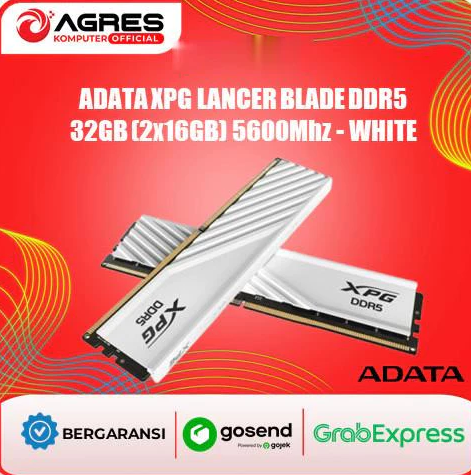

sample device type for ddr5
Along with the widespread adoption of DDR5 technology, various devices began to support the use of DDR5 RAM. Here are some examples of types of devices that use DDR5:
High-end desktop PC
High-end desktop PCs, especially those used for gaming and content creation, are starting to adopt DDR5 to improve performance. Motherboards with the latest chipsets such as the Intel Z690 and AMD X670 support DDR5.
Gaming and Professional Laptops
The latest gaming laptops from well-known brands such as ASUS ROG, MSI, and Alienware have started to integrate DDR5 to provide better performance in playing games and other heavy applications.
server and workstation
High-end servers and workstations, which are used for heavy applications such as data analysis, 3D rendering, and scientific simulations, start using DDR5 to maximize memory capacity and speed.
Mini-PC and NUC
Several mini-PCs and NUC (Next Unit of Computing) from Intel also started supporting DDR5, offering higher performance in smaller and more efficient form factors.


Conclusion
The development of RAM memory technology from DDR4 to DDR5 brings significant improvements in terms of speed, capacity, energy efficiency, and overall performance. DDR5 offers a bright future for various computing applications, both for home users, professionals, and enterprises.
FAQ
Q: What is the main difference between DDR4 and DDR5? A: The main difference between DDR4 and DDR5 lies in data transfer speed, capacity, power consumption, architecture, and efficiency. DDR5 has higher speed, larger capacity, lower power consumption, and more efficient architecture than DDR4.
Q: What is the maximum RAM capacity for DDR4 and DDR5? A: The maximum RAM capacity for DDR4 on desktop PCs is generally up to 128GB, while DDR5 can reach up to 256GB. For laptops, DDR4 supports up to 64GB, while DDR5 is estimated to support up to 128GB. On servers, DDR4 can support up to 1.5TB or more, while DDR5 is expected to support up to 2TB or more.
Q: What is an example of a device that supports DDR5? A: Devices that support DDR5 include high-end desktop PCs, gaming and professional laptops, high-end servers and workstations, as well as mini-PC and NUC.
Q: Is DDR5 better than DDR4? A: In general, DDR5 offers various improvements over DDR4, including higher speed, greater capacity, and better energy efficiency. However, the needs of each user may vary, and this increase may not always be necessary for all applications.
Thus, understanding the difference between DDR4 and DDR5 and its potential benefits can help you make the right decisions when upgrading or buying a new device.