Gemini in Chrome Reveals What You’re Viewing on Screen

New Feature Enhances Gemini’s Contextual Understanding in Chrome
Google is enhancing the capabilities of its AI assistant, Gemini, by making it more aware of what’s happening within Chrome. A new feature called “Select from screen” has been rolled out, allowing users to highlight specific text or images on a webpage and send them directly to Gemini. This makes conversations with the AI assistant more contextual and relevant.
How the Feature Works
The “Select from screen” feature is available in the “+” menu of Gemini in Chrome. It functions similarly to a built-in screenshot tool. Once activated, users can select any text or image visible in the current browser tab. The selected content is automatically attached to a Gemini prompt. Instead of manually describing what’s on a webpage, users can point Gemini at the exact content they need help with.
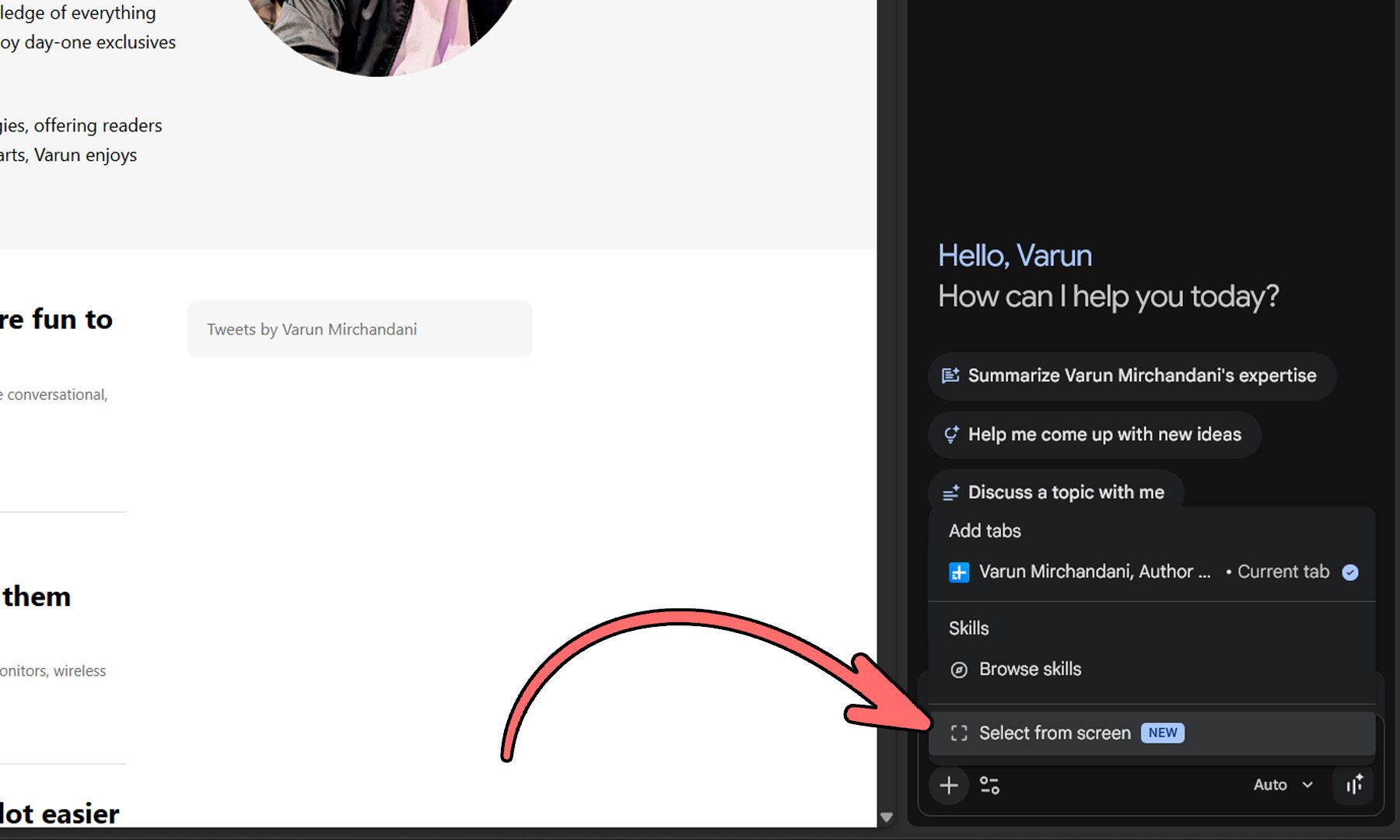
This new capability is part of Chrome 149. However, some users may need to restart their browser before the feature becomes available. The update aligns with Google’s efforts to make Gemini feel less like a standalone chatbot and more like an assistant that is aware of what users are actively doing.
Additional Upgrades to Gemini
The timing of this update is significant as Google announced another major upgrade to Gemini on the same day. Developers can now access computer use capabilities directly through Gemini 3.5 Flash. This allows AI agents to see, reason, and take actions across browsers, mobile apps, and desktop environments without relying on a separate model. Google claims that this integration improves long-horizon tasks such as software testing, enterprise workflows, and other multi-step automation jobs.
Moving Beyond Traditional Chatbots
This update seems to be Google’s response to the idea that “AI should know what I’m looking at.” Rather than introducing a new feature, the focus is on reducing friction. By enabling Gemini to understand exactly what’s on the screen and interact with it directly, Google is moving beyond the traditional chatbot experience. The goal is to create an AI assistant that can understand context, anticipate user intent, and help complete tasks rather than just answer questions.
Conclusion
With these updates, Google continues to push the boundaries of what an AI assistant can do. The “Select from screen” feature and the integration of Gemini 3.5 Flash demonstrate a commitment to making AI more intuitive and integrated into everyday tasks. As these features become more widely available, users can expect a more seamless and efficient experience when interacting with Gemini in Chrome.