Recommended light windows 11 mod for 2gb ram pc for free lag
11 August 2026
5 menit membaca
Executive Summary (Direct Answer)
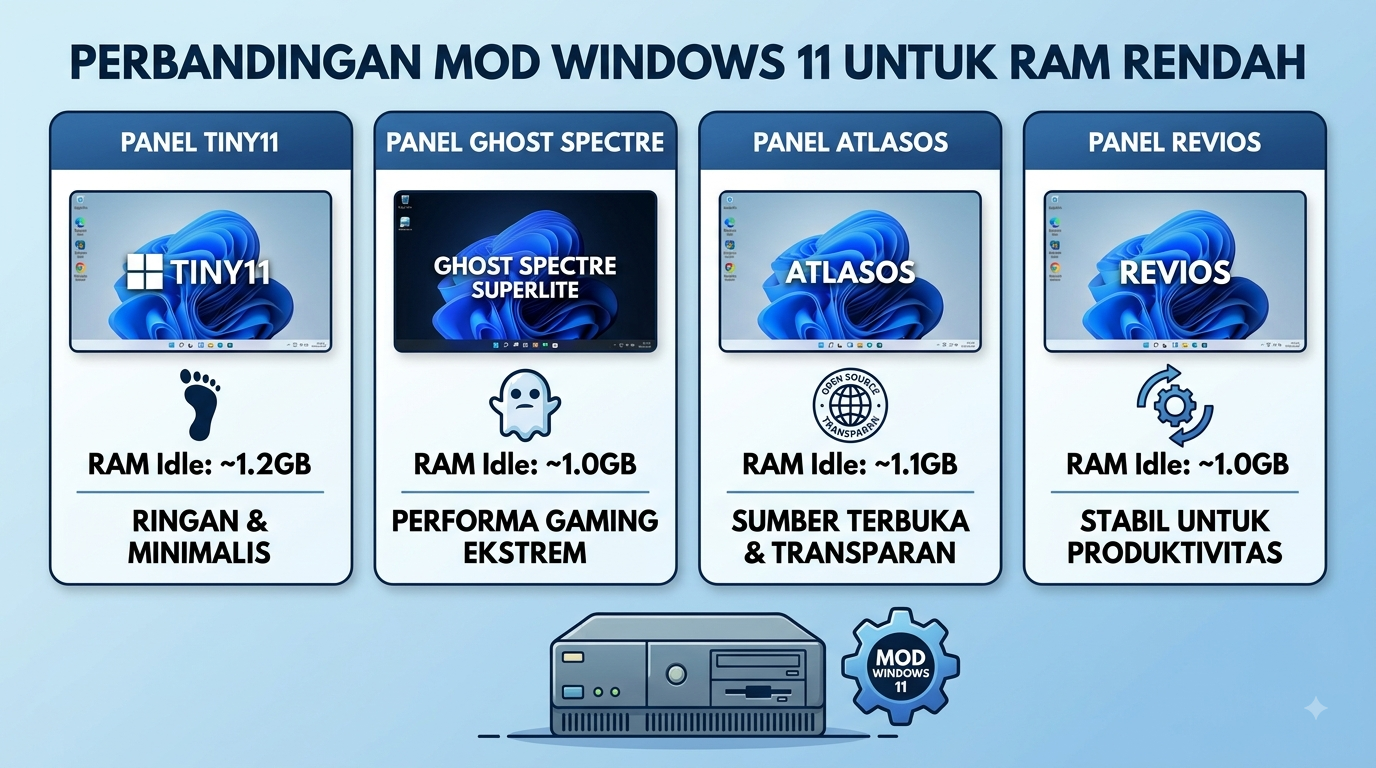
High memory efficiency: Modified operating systems such as Tiny11, Ghost Specter, Atlasos, and Revios are able to cut idle RAM consumption from 3.5GB–4GB in the standard version to only 1GB–1.5GB.
Cleaning bloatware & Service: Decreased memory load is achieved by deleting the default application not essential, disabling telemetry, and cutting hardware requirements such as TPM 2.0.
Feature compromise & Security: Despite significantly boosting the performance of potato laptops, the use of OS modifications demands user caution regarding automatic updates and built-in cyber defense.
The Windows 11 operating system is here to bring modern visual refreshment and a variety of artificial intelligence-based features. However, behind the captivating interface, the standard Windows 11 consumes a large amount of hardware resource consumption. Laptop or PC users with limited RAM—such as 2GB to 4GB—often experience problems in the form of a broken system (lag), a long boot time, to swelling of RAM consumption at idle which reaches more than 70 percent.
Based on extensive tests conducted by the editorial team of Lidahtekno.com, the main obstacle to Windows 11 being slow on low-spec devices lies in the number of default applications (bloatware), background services that run continuously, and telemetry monitoring systems. An alternative solution that is now increasingly popular among the tech community is to take advantage of the modification of the operating system (OS MOD). This review article dissects the most stable row of Windows 11 Mod 11 Lightweight Lowest Ram along with its advantages and notes.
Why is the Windows 11 standard less device-friendly low-end specifications?
Microsoft has officially set the minimum RAM limit for Windows 11 by 4GB. However, in the practice of daily use, the built-in system requires about 3.2GB to 3.8GB of RAM just to run the background process after the process of turning on the device is complete. Applications such as Microsoft News, Cortana, Xbox Live Services, to widgets automatically absorb memory resources that should be allocated to daily applications such as web browsers or work documents.
This condition worsens the performance of old school laptops or entry-level devices. The presence of the Windows 11 mod is specially designed to cut those excess components without damaging the core functions of the Windows ecosystem.
List of Best Low Ram Ram Windows 11 Mods
1. Tiny11 by NTDEV
Tiny11 is one of the most phenomenal Windows 11 modification projects developed by independent developer NTDEV. This modification is based on Windows 11 Pro 22H2/23H2 which is peeled down to the most basic components. Based on direct testing at the Lidahtekno.com editorial laboratory, Tiny11 can run smoothly on devices that are only equipped with 2GB of RAM. RAM consumption at idle can even be reduced to the range of 1GB to 1.2GB only.
Components such as Microsoft Teams, News, Cortana, and built-in applications that are rarely used have been permanently removed. The main advantage of Tiny11 is that it maintains the Microsoft Store, so that users can still download supporting applications safely and practically.
2. Ghost Specter Windows 11 Superlite
For gamers and users who crave extreme performance on a low-class PC, Ghost Specter is one of the most trusted names. The developer Ghost Specter offers version variants SUPERLITE and Compact.
The superior feature of this modification is the availability Ghost Toolbox, which is a special utility that allows users to install or remove features customized, such as re-enabled Windows Update, selecting the default browser, to optimizing power settings for gaming. Idle RAM consumption in the Superlite variant ranges from 900MB to 1.1GB.
Different from Tiny11 or Ghost Specter which is distributed in the form of ISO files that have been remodeled directly, Atlasos carries a more transparent and open approach. AtlasOS is an open-source project that runs through the official Playbook script on a pure Windows 11 installation.
This approach is much safer because users download the official ISO from Microsoft first before running the Atlasos optimization process. This modification focuses on reducing system latency, removal of telemetry that tracks user activity, and maximum efficiency of CPU and RAM usage.
4. Revios (Revision)
Revios is specially designed to meet the needs of gamers and content creators that require high stability without adverse background burden. Revios integrates a named tool Revision tool which makes it easy to configure privacy, security, and system performance.
The system successfully throws the load of triggers for CPU and RAM spike, making it an ideal choice for devices with limited memory that want to stay responsive when used for light multitask tasks.
Windows 11 MOD Comparison Table Low RAM
Adapted from comparative testing of custom operating systems, here are the technical data to help you determine the modifications that best suit your hardware needs:
OS Mod Name
Idle RAM estimation
Disk installation size
Availability of Microsoft Store
target user
Tiny11
~1.0GB – 1.2GB
~8 GB – 10 GB
Yes (available)
Daily use & lay users
Ghost Specter
~900 MB – 1.1 GB
~7GB – 9GB
Optional (via Ghost Toolbox)
Potato device gamer & power user
Atlasos
~1.1GB – 1.3GB
~10GB – 12GB
can be activated
Security & Latency Priority User
Revios
~1.0GB – 1.2GB
~9 GB – 11 GB
can be activated
Gamers & Multitask Productivity
Practical Step Guide to Installing Windows 11 Mod
If you’re interested in reviving your old laptop or PC with Windows 11 mod, follow these easy installation steps:
Back up important data: Secure all your personal files to external storage media or cloud storage before reinstalling.
Download the official file: Get ISO files or installation scripts directly from the repository or official website of the modification developer (such as the official GitHub Atlasos or the official NTDE channel).
Prepare a bootable flash: Use the Rufus application to create a USB installation media. In Rufus settings, enable the option to disable the TPM 2.0 requirements, Secure Boot, and a minimum 4GB RAM limit.
Clean install process: Go to the BIOS/UEFI menu of your device, set the boot priority to the USB Flashdisk, then format the main system partition.
Post-installation configuration: After successfully logging into the desktop, install the official hardware driver according to your device manufacturer and activate the additional security scanner software.
Risks of using OS modifications and how to minimize them
Although the use of Windows 11 mod provides a very significant performance improvement on low-spec devices, the editorial team of Lidahtekno.com warns of some technical risks to consider:
Secure security updates: Most OS Mods disable Windows Update services permanently to prevent the re-entry of bloatware. This can make the system vulnerable to new security loopholes.
Potential application incompatibility: The removal of certain components (such as some .NET frameworks or built-in media players) sometimes causes specific applications to malfunction.
Potential malware threat: Downloading modified ISO files from non-clear third-party sources risk inserting malicious programs or spyware.
To minimize these risks, always make sure you download files from trusted community sources, install a third-party mild antivirus, and avoid using this modified device for banking or sensitive financial data processing.
LidahTekno.com is supported by Google Adsense advertising to provide content for you.Please consider disabling AdBlocker or adding us to your whitelist so we can continue providing the best technology information and tips.Thank you for your support!