how to check digital tv signal in our area

Ensuring access to digital TV broadcasts in our area is very important in this digital era. With the transition from analog to digital broadcasting through analog switch off (ASO) programs, viewers throughout Indonesia must now ensure that they can receive digital TV signals. The following is a complete guide on how to check digital TV signals in our area, with information from trusted sources.
Why is the switching to a digital TV important?
The transition to digital TV broadcasts brings many advantages over analog broadcasts. Better picture and sound quality, more channels are available, and more efficient use of the frequency spectrum are some of them. Therefore, making sure that your area has turned to digital broadcasting and that you can receive this signal is an important step.
steps and how to check digital tv signal in our area
- Access the official website of KOMINFO
To get the latest information about areas that have switched to digital broadcasts, visit the official website of the Ministry of Communication and Information (Kominfo) at broadcastdigital.kominfo.go.id/region-siaran-tv-digital. On this site, you can find a complete list of areas that have done analog switches off (ASO) and digital broadcasts that have been active.
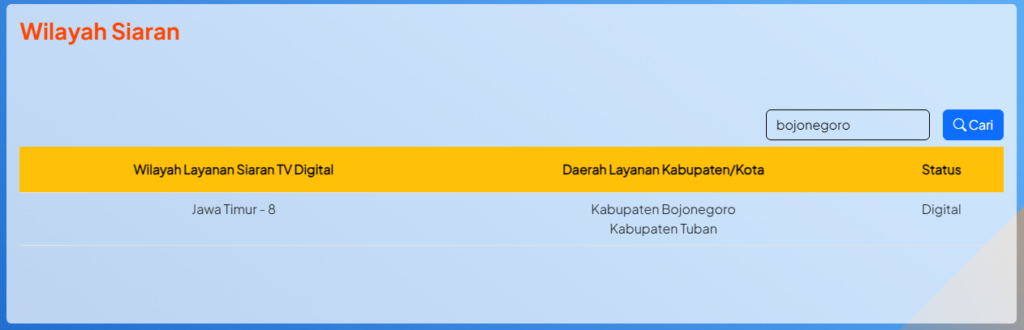
- Select your region
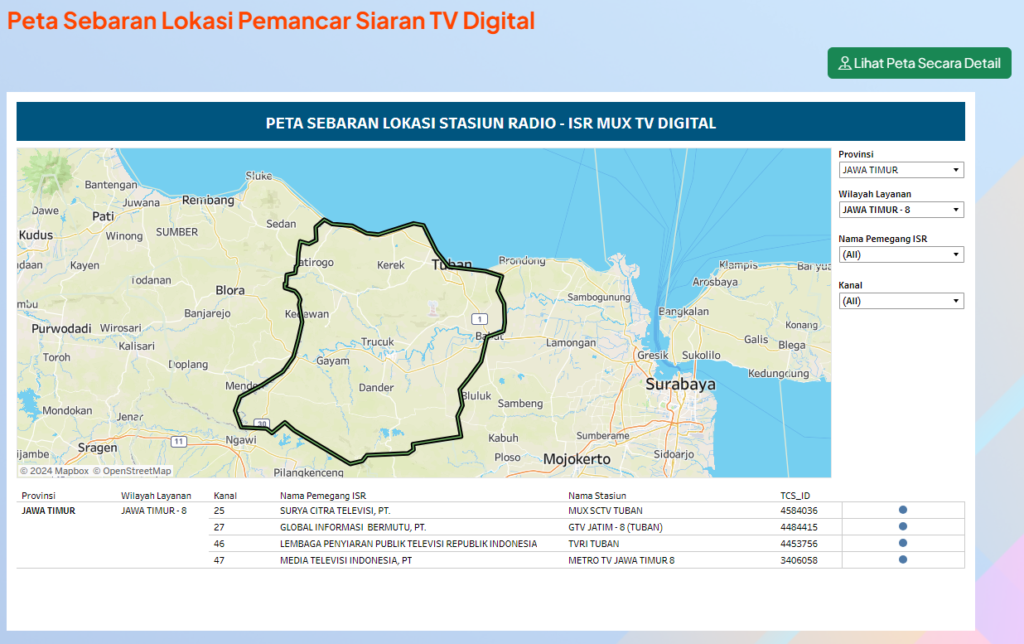
After opening the Kominfo website, search and select your region from the list available. This site provides detailed information about the status of digital broadcasts in every region in Indonesia, including a list of channels of transmitters and radio station permit holders (ISR).
- Check the list of channels and ISR holders
The Kominfo website provides information about ISR holders on available transmitter channels. This information is important to know which TV stations you can access in your area.


use other tools
In addition to visiting the Kominfo website, you can also use third-party applications or other tools to check the strength of digital TV signals in your area. Here are some methods you can try:
- digital tv signal detector application
Some apps on Android and iOS devices can help you detect the digital TV signal strength in your area. These applications usually use GPS to determine your location and provide information about the available signal strength.
- Digital TV settings
Digital TVs or modern set-top boxes are usually equipped with a settings menu that allows you to check signal strength. You can access this menu through the remote control and follow the instructions.
Strengthen Digital TV Signal
If you find that the digital TV signal in your area is weak, here are some ways to strengthen it:
- Use the appropriate antenna
Make sure you use an antenna that is compatible with digital TV broadcasts. Outdoor antennas usually give better results than indoor antennas, especially if you live in areas with many tall or mountainous buildings.
- antenna position
Try to place the antenna in a high and open place, away from distractions such as large buildings or trees. Point the antenna to the nearest digital TV transmitter.
- Use a signal booster
If the signal is still weak, you may consider using a signal amplifier. The signal amplifier can help increase the signal strength received by the antenna.
Tips for Maximizing the Use of Digital TV
- Check cables and connectors
Make sure all cables and connectors are in good condition and properly attached. Damaged cables or loose connectors can cause a weak signal.
- firmware update
If you use the set-top box, make sure the device firmware is always updated. Firmware updates usually bring improvements and performance improvements.
Questions related to how to check digital tv signals in our area
Q: How do I know if my area has switched to a digital TV?
A: You can visit the site broadcastdigital.kominfo.go.id/region-siaran-tv-digital To get complete information about digital broadcast status in your area.
Q: Do I need a special antenna to receive digital TV signals?
A: Yes, a special digital TV antenna is needed to receive the signal properly. Outdoor antennas are usually more effective than indoor antennas.


Q: What should I do if the digital TV signal in my area is weak?
A: You can try several steps such as using an outdoor antenna, placing the antenna in a high place, or using a signal amplifier.
Q: Is there an additional fee to switch to digital TV broadcasts?
A: There is no additional subscription fee for watching digital TV broadcasts. However, you may need to purchase an antenna or set-top box if your TV does not support digital broadcasts.
Q: How do I update my set-top box firmware?
A: You can update the Set-Top Box firmware through the Device Settings menu. Make sure you have a stable internet connection when performing updates.
Conclusion
Checking digital TV signals in your area is an important step to ensure you can enjoy high-quality TV broadcasts. By following the guidelines above, you can make sure that you receive a digital TV signal well and maximize your viewing experience. Don’t forget to visit the site broadcastdigital.kominfo.go.id/region-siaran-tv-digital For the latest information about digital broadcast status in Indonesia.