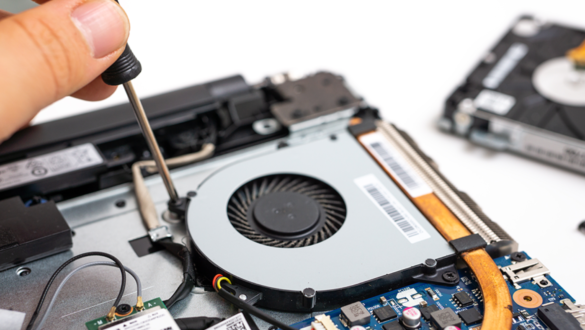
This component for 10 thousand turns out to be the culprit for your PC and laptop often errors

Have you ever turned on a PC or laptop, then suddenly found the clock in the corner of the screen back to 2000 or even 1970? Not to mention when trying to open a web browser like Google Chrome, a row of well-known sites suddenly can’t be accessed with an insecure connection warning. Under these conditions, not a few users panic and assume that motherboard or storage media (SSD/HDD) their computer has been badly damaged.
However, before you rush to spend millions of rupiah to take the device to a service center, it’s a good idea to breathe a sigh of relief. The problem that seems complicated is often only caused by a small component the size of a coin that costs less than ten thousand rupiah. The most often forgotten vital components are CMOS battery.
What is a CMOS battery and what is its main function?
CMOS stands for Complementary metal-oxide-semiconductor. Inside the circuit motherboard, there is a small low-power memory chip that functions to store the basic configuration of a computer system, such as the order of calling media storageBoot order), memory speed profile (XMP/EXPO), to the real time system and date known as Real-time clock (RTC).
Because the CMOS memory chip is volatile (requires continuous electric current so that the data is not lost), the computer needs a backup power when the device is turned off or unplugged from the power plug. This is where the CMOS battery takes its main role. This battery is in charge of flowing micro-electric power constantly so that the memory chip and RTC continue to work precisely even though the computer is completely off for a long time.
Adapted from the Voniko Shop manufacturing research, the majority motherboard Modern desktop PCs and laptops use coin batteries CR2032 3 volts. This number code has its own technical meaning: letters C denotes chemicals Lithium manganese dioxide, R shows a circular shape (Round), numbers 20 20 mm in diameter, and the number 32 shows the battery thickness of 3.2 mm.

5 Main Symptoms Your CMOS Battery Is Out of Power
When the CMOS battery voltage drops below the minimum limit (generally below 2.8 volts), the system is no longer able to maintain BIOS/UEFI memory. Here are the clinical signs that you must recognize in the editor Lidahtekno.com:
- System time and date always reset: Every time the computer is restarted from a totally dead condition, the system clock returns to factory settings.
- An error message appears when booting: The monitor screen displays a warning message such as “CMOS checksum error”, “CMOS Battery Low”, or “Press F1 to Run Setup”.
- Blocked websites due to SSL certificate issues: As explained in the Cyber Analysis by GSE Tech, the timing mismatch on the RTC causes the operating system to fail to validate the SSL/TLS security certificate. As a result, the browser will block access to cloud-based websites and services.
- BIOS/UEFI settings always return to default: If you customize the order Booting drive or do Overclocking On the processor, the entire configuration will be deleted automatically when the electric current is cut off.
- The computer has failed POST or Slow booting: on some models motherboard In particular, the absence of CMOS power makes the system have to re-initialize the hardware components in full every time it is turned on.
How long is the CMOS battery life?
Based on the technical records of computer component manufacturers, the CR2032 type CMOS battery has a relatively long durability. 3 to 5 years For normal use, it can even last up to 8-10 years under ideal environmental conditions.


The main factor affecting the duration of use is the frequency of use of the computer and whether the main power cable remains connected to the outlet. When the computer is connected to the electric current of the room, motherboard will take advantage of the power of the main power supply unit, so that the CMOS battery load is reduced significantly. On the other hand, if the PC is often completely unplugged from the power source, the CMOS battery will work extra hard without stopping.
Guide How to Replace Your Own CMOS Battery at Home
Replacing a CMOS battery does not require a high level of technical expertise. Adapted from the ASUS and CCM Hardware Repair Guide, you can do it yourself independently with the following safe steps:
1. Electrical safety preparation
Turn off your PC or laptop perfectly (Shutdown). Unplug the power cord from the outlet. For laptop users, remove the main battery (if using an external/removable type) and press the power button for 5-10 seconds to drain the remaining static current in the circuit.
2. Open the case and find the battery location
Open the PC case cover or laptop base cover. Look for a flat silver coin battery measuring 500 rupiah in the parent board area (motherboard). On some modern thin laptops, the CMOS battery is sometimes wrapped in black insulation and connected via a two pin micro cable to the motherboard.
3. Removing the old battery
On the desktop PC socket, there is a metal lock lever on the side of the battery compartment. Gently press the lever outwards using a finger or a small minus screwdriver with a plastic footing. The battery will automatically lift from the holder.
4. Install the new CR2032 battery
Prepare a new quality CR2032 coin battery. Insert the battery with the positive pole position (the side with the brand and the + sign) facing up. Press gently until you hear a click that indicates the lock is installed perfectly.
5. BIOS time reconfiguration
Close the PC case again, plug the power cable, then turn on the computer. When booting for the first time, go to the BIOS/UEFI menu (usually by pressing the key Delete, F2, or F12) to set the current date and time accurately, then save the changes (Save and exit).
Lidahtekno.com Editor’s Note: Make sure you use a quality CR2032 battery from a trusted brand. Poor quality coin batteries have a high level of electrolyte fluid leakage which is at risk of damaging the copper lines on the motherboard circuit.
Conclusion
Electronic components do not always have to be expensive to play an important role. CMOS batteries are clear evidence that small objects for tens of thousands of rupiah can be the main determinant of the stability and security of your computer’s operations. If your PC or laptop starts to show random dating issues or error messages on the boot screen, don’t rush to panic—just replace the CMOS battery, and your computer will return to normal.