How to find out an SSD or HDD laptop becomes very important for us when buying a laptop. Today, SSDs are becoming increasingly popular because they have high data transfer speeds and are more durable compared to HDDs. However, HDD is still the right choice for jobs that require large storage capacity with a limited budget. Therefore, knowing the type of storage on the laptop that we have is an important key in maximizing performance and storage capacity according to needs.
In this guide, we will discuss in detail about SSD and HDD and provide tips for choosing a laptop with the right type of storage. In addition, we will also discuss how to check the type of storage on a laptop, either through Device Manager on Windows, Command Prompt on Windows, or Terminal on macOS. By knowing these ways, we will be able to ensure the type of storage on the laptop that we have and choose a laptop with the right type of storage for the work we do.
Types of laptop storage
Solid State Drive (SSD)
Solid State Drive or SSD is a type of data storage on a laptop that uses non-volatile memory (NVM) technology to store data permanently. SSD uses a flash memory chip to store data electronically, without using a magnetic disk such as on a hard disk drive (HDD).
Advantages of SSD
Faster: SSDs have faster data transfer rates compared to HDDs because they don’t use magnetic disks.
More Durable: SSDs do not have mechanical components such as HDDs so they are more durable and not easily damaged.
More power saving: SSD requires less power than HDD so it can make the laptop more power efficient.
Lighter and Thinner: The SSD has a smaller size and lighter than the HDD making it suitable for laptops with thinner and lighter designs.
More Durable: SSD has a longer service life than HDD because it does not use a magnetic disk that can be worn and damaged.
lack of SSD
More expensive: SSDs are more expensive than HDDs with the same storage capacity.
More limited storage capacity: SSDs have a smaller storage capacity compared to HDDs at the same price.
Hard Disk Drive (HDD)
Hard disk drive or HDD is a type of data storage on a laptop that uses magnetic technology to store data on a rotating disk. HDD has been around for a long time and is the most common type of data storage used on laptops.
Advantages of HDDs
Cheaper: The price of HDD is cheaper compared to SSDs with the same storage capacity.
Larger storage capacity: HDD has a larger storage capacity compared to SSDs at the same price.
Easy to Upgrade: HDD is easy to upgrade its storage capacity because it can be replaced with an HDD that has a larger capacity.
More compatible: HDD is more compatible with existing laptops and operating systems.
lack of HDD
Slower: HDD has a slower data transfer rate compared to SSDs because it uses magnetic disks.
More susceptible to damage: The HDD has mechanical components that can be damaged by friction and falls, making them vulnerable to damage.
Heavier and Thicker: The HDD has a larger size and heavier than the SSD, making the laptop feel heavier and thicker.
Hybrid Drive (SSHD)
Hybrid Drive or SSHD is a type of data storage on a laptop that combines SSD and HDD technology in one unit. SSHD has SSD and HDD components in one unit that functions to store data quickly on SSD components and permanently store data on HDD components.
Advantages of SSHD
Faster than HDD: SSHD has a faster data transfer rate than HDD because it uses SSD components.
Larger storage capacity compared to SSD: SSHD has a larger storage capacity compared to SSDs at the same price.
More power saving compared to HDD: SSHD requires less power than HDD so it can make the laptop more power efficient.
lack of sshd
Not as fast as SSD: SSHD is still slower than SSD in terms of data transfer speed.
Vulnerable to damage such as HDD: SSHD still has mechanical components such as HDD so it is prone to damage such as HDDs.
Limited SSD storage capacity: SSD components in SSHD have limited storage capacity compared to regular SSDs.
how to find out ssd or hdd laptop
In this section, we will explain further about how to check the type of laptop storage. How to find out an SSD or HDD laptop in three different ways, namely using a device manager on Windows, a command prompt on Windows, and a terminal on macOS.
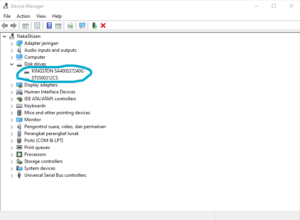
via Device Manager on Windows
Steps:
Open Device Manager on a Windows laptop.
Find and click Disk Drives.
After that, a list of disks connected to the laptop will appear.
Check the type of disk connected to the laptop whether it says “Solid State Drive” or “Hard Disk Drive”.
does not provide detailed information about the type of disk.
Via Command Prompt on Windows
Steps:
Open the Command Prompt on a Windows laptop.
Type the command “Wmic DiskDrive Get Model, InterfaceType”.
After that, information will appear about the type of disk connected to the laptop.
Pros:
Provides detailed information about the type of disk.
easy to do.
Cons:
The view is not easy to understand.
via terminal on macOS
Steps:
Open a terminal on a macOS laptop.
Type the command “Diskutil Info / | grep “solid state” to check if the disk connected to the laptop is an SSD.
Type the command “Diskutil Info / | grep “Media Type” to check if the disk connected to the laptop is HDD.
Pros:
Provides detailed information about the type of disk.
easy to do.
Cons:
The display is not easy to understand for lay users.
Evaluate the type of laptop storage
After knowing the types of laptop storage, it is important to evaluate each type of storage in terms of performance and capacity.
Performance
data transfer speed
SSDs have data transfer speeds that are much faster than HDDs. This happens because SSD uses flash memory technology that does not require moving parts like the HDD. In comparison, the SSD has a data transfer rate of up to 550 MB/s while the HDD is only about 120 MB/s.
boot time
The boot time or the time it takes to open the operating system on the laptop is also a consideration in evaluating the type of laptop storage. SSDs have a much faster boot time compared to HDDs because SSDs don’t have moving parts like HDDs. In comparison, the SSD boot time can reach less than 10 seconds while the HDD can reach 30 seconds or even more.
Capacity
Storage size
Laptop storage capacity is also an important factor in evaluating the type of laptop storage. HDD has a larger storage capacity compared to SSDs. The HDD can reach storage capacity of up to 10 TB while the SSD only reaches a storage capacity of up to 4 TB.
Price
In addition to storage capacity, price is also an important factor in evaluating the type of laptop storage. HDDs have a cheaper price compared to SSDs. In comparison, the price of an HDD with a storage capacity of 1 TB can reach half the price of an SSD with the same storage capacity.
In evaluating the type of laptop storage, it should also be noted that performance and capacity factors do not always apply in absolute terms. For example, SSDs with smaller storage capacity may have data transfer rates and faster boot times than HDDs with larger storage capacity. Therefore, it is necessary to consider the needs and use of the laptop to be purchased in order to be able to choose the right type of storage.
Advantages of Using SSD on a Laptop
Solid State Drive (SSD) is a type of storage that is increasingly popular among laptop users. Here are some of the advantages of using an SSD on a laptop:
faster
SSD uses flash memory technology to store data, so the process of reading and writing data is faster than HDDs that use magnetic disks. This makes SSD the right choice for those who need a high-performance laptop.
more resilient
SSDs do not have mobile components such as HDDs, so they are more resistant to shocks and vibrations. This makes the SSD more suitable for use on laptops that are often carried around or used when traveling.
More power saving
SSDs require less power compared to HDDs, because they do not have a magnetic disk to be rotated. This means that the use of an SSD on a laptop will save battery and extend the battery life.
Lighter and thinner
SSDs have a smaller size compared to HDDs, thus making the laptop lighter and thinner. This is very useful for those who travel a lot and need a laptop that is easy to carry.
more durable
SSDs do not have mobile components such as HDDs, thus minimizing the risk of physical damage that can occur on the HDD. This makes SSDs have a longer service life compared to HDDs.
In some cases, the use of an SSD on a laptop can increase performance by up to 10 times compared to HDDs. However, the price of an SSD which is relatively more expensive than HDD is a factor to consider before deciding to upgrade or buy a new laptop with an SSD.
Advantages of using HDD on a laptop
After understanding the difference between SSD and HDD on a laptop, it is important to know the advantages of using the HDD on the laptop. Here are some of the advantages that HDD has:
Cheaper
HDD is a more affordable option compared to SSDs. If you have a limited budget, HDD can be a good alternative because the price is cheaper.
larger capacity
HDD has a larger storage capacity compared to SSDs. If you need a large storage space, HDD can be the right choice.
Easy to upgrade
HDDs are easier to upgrade when compared to SSDs. Users can easily replace the old HDD with a new one if the storage capacity is full.
more compatible
HDDs are more compatible with many devices compared to SSDs. If you need an external storage device, HDD can be the right choice because it can connect with various devices.
When to use SSD or HDD on a laptop
When choosing a laptop, the choice of the type of laptop storage is one of the important factors that must be considered. Whether you have to choose a laptop with a solid state drive (SSD) or a hard disk drive (HDD) depending on the type of work you are going to do, budget, and personal preferences.
Jobs that require high data transfer speed
If you’re doing a job that requires high data transfer speeds, such as video editing, rendering, or graphic design, an SSD might be the best option for you. SSDs are able to read and write data faster than HDDs, so you can save time in the process.
Jobs that require high portability
If you often travel with your laptop, portability is an important factor in choosing the type of storage. The SSD is lighter and thinner than the HDD, making the laptop easier to carry on the go.
jobs that require large storage capacity
If you need a large storage capacity, the HDD may be a better option. HDD offers a larger storage capacity at a more affordable price compared to an SSD. This is a significant advantage if you need to store a lot of files, such as a collection of music or videos.
limited budget
If you have a limited budget, HDD may be a more reasonable option because the price is more affordable compared to an SSD. However, if you are able to spend more money, choosing a laptop with an SSD may provide a faster and more efficient experience in carrying out your tasks.
[irp posts=”612″ ]
Tips for Choosing & how to find out ssd or hdd laptop
Choosing a laptop with the right type of storage is one of the important factors to support your performance and productivity. Here are some tips for choosing a laptop with the right type of storage:
1. Understand the needs
Before choosing a laptop, be sure to understand your needs first. Do you need a laptop that is light and easy to carry anywhere or a laptop that has a large storage capacity? Are you going to use it for gaming or just for light tasks like browsing and typing? Knowing your needs will help you choose a laptop with the right type of storage.
2. Knowing the type of work to be done
After understanding the need, the next step is to know the type of work to be done with the laptop. If you need a laptop with a high data transfer speed, then an SSD is the right choice. However, if you need a large storage capacity, then the HDD can be a more suitable choice.
3. Choose a laptop that fits your budget
Finally, make sure to choose a laptop that fits your budget. SSDs are usually more expensive than HDDs, so if you have a limited budget, choosing a laptop with a type of HDD storage can be a more appropriate choice. However, if the budget is not a problem, then choosing a laptop with an SSD type of storage can provide a better usage experience.
conclusion how to find out ssd or hdd laptop
After understanding the difference between SSD and HDD, as well as how to check the type of storage on a laptop, we can conclude several important things:
Why it’s important to know the type of storage on a laptop
Knowing the type of storage on a laptop is very important because this will affect the performance and storage capacity that we will get. If we choose the wrong type of storage, we can get a laptop that is too slow or doesn’t have enough storage space.
conclusion about ssd and hdd
SSDs and HDDs each have advantages and disadvantages. SSD is faster, durable, power efficient, lighter and thinner, and more durable. While HDDs are cheaper, larger capacity, easy to upgrade, and more compatible. We need to consider our needs and budget when choosing the right type of storage.
When to use SSD or HDD on a laptop
We have to use an SSD on a laptop if we need a high data transfer speed and high portability, and have a sufficient budget. Meanwhile, HDD is more suitable for use on laptops if we need a large storage capacity and a limited budget.
In choosing the type of laptop storage, it is important to consider the needs and existing budget. Choose the right type of storage to maximize the performance and storage capacity of our laptop.
Questions related to how to find out an SSD or HDD laptop
Apa perbedaan antara SSD dan HDD?
SSD (Solid State Drive) and HDD (Hard Disk Drive) are two types of storage on laptops. SSDs use flash memory chips to store data, while HDDs use magnetic disks to store data. The main advantage of SSD is the faster data transfer speed, while the HDD has a larger storage capacity and is more affordable.
Bagaimana cara mengecek jenis penyimpanan laptop?
There are several ways to check the type of laptop storage, such as through the Device Manager on Windows, Command Prompt on Windows, or Terminal on macOS.
Apa keuntungan menggunakan SSD pada laptop?
The main advantage of using an SSD on a laptop is that the data transfer speed is faster, more durable, more power efficient, lighter and thinner, and more durable.
Kapan harus menggunakan HDD pada laptop?
HDDs are still more suitable for use on laptops for jobs that require large storage capacity, such as storing video files or games. In addition, a limited budget can also be a reason to choose an HDD.
Bagaimana cara memilih laptop dengan jenis penyimpanan yang tepat?
To choose a laptop with the right type of storage, you must first understand the needs and type of work to be done. If the job requires high data transfer speed and portability, SSD can be a better choice. However, if the work requires a large storage capacity, then the HDD can be a more appropriate choice. In addition, you also have to choose a laptop that fits your budget.
LidahTekno.com is supported by Google Adsense advertising to provide content for you.Please consider disabling AdBlocker or adding us to your whitelist so we can continue providing the best technology information and tips.Thank you for your support!