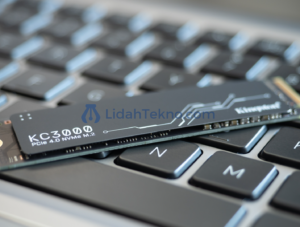
The speed and performance of data storage is one of the crucial aspects in supporting the performance of computer devices. SSD (Solid State Drive) has become the main choice because of its advantages over traditional hard disks. However, when talking about SSDs, many are still confused by the terms “M.2” and “NVME”. This article will thoroughly explore the differences between the M.2 and NVMe SSDs, and provide insight into the advantages and disadvantages so that you can make the right choice as needed.
Preliminary
Data storage technology has undergone a massive revolution over the last decade. SSD is here as a solution to overcome the limitations of slow mechanical hard disks and is prone to damage. However, not all SSDs are created equal. There are various factors that affect performance, one of which is the interface and the protocol used. Two terms that are often heard are M.2 and NVMe. Although it sounds similar, the two have fundamental differences that users need to understand, especially for those who want to improve computer performance or build high-end gaming and workstation systems.
In this article, we will discuss:
Definition and Characteristics of SSD M.2
the meaning and mechanism of action of nvme
Detailed comparison between M.2 and NVMe SSDs
The advantages and disadvantages of each technology
Tips for choosing the right SSD according to your needs
Future view of storage technology
What is SSD M.2?
SSD M.2 is a physical format or form of SSD aimed at optimizing space in modern devices such as ultrabooks, laptops, and mini desktops. The M.2 format is small and sleek, allowing manufacturers to make devices that are thinner and lighter without sacrificing performance.
Main characteristics of SSD M.2
Size and shape: SSD M.2 comes in various sizes, usually in 22x80mm, 22x42mm, or other variations. Its sleek design makes it suitable for devices with limited space.
Connectivity: SSD M.2 can use SATA or PCIe interface. When using PCIe, the M.2 SSD can take advantage of a much higher data transfer rate.
Flexibility: Apart from being a storage, the M.2 slot can also be used for Wi-Fi cards, Bluetooth, and other modules. This gives additional flexibility to the motherboard design.
Compatibility: Not all M.2 slots support the NVMe protocol. Some only support SATA, so even though it is in M.2 format, the transfer speed is not as high as an NVMe-based SSD.
With the above understanding, it is important to remember that the term “M.2” refers to the SSD form factor, not the speed or communication protocol.
What is NVMe?
NVMe (Non-Volatile Memory Express) is a communication protocol specifically designed for SSDs that use the PCIe interface. This protocol is designed so that SSDs can operate at high speed, reduce latency, and optimize the use of parallelism in storage systems.
Advantages of the NVMe Protocol
Data transfer speed: NVMe enables much higher data reading and writing speeds compared to the SATA protocol. It is very useful for heavy applications such as gaming, video processing, and intensive computing.
Low latency: With lower latency, NVMe can provide a faster response when accessing data, which means overall system performance will increase.
Better Parallelism: NVMe utilizes a multi-core architecture in the CPU, so it can handle multiple commands simultaneously without bottlenecks.
Energy Efficiency: With a more modern design, NVMe-based SSDs are generally more efficient in terms of power consumption, especially when used on portable devices such as laptops.
NVMe is not a physical format, but a communication protocol. Therefore, M.2-shaped SSDs that use NVMe can offer the best performance, but not all M.2 SSDs use NVMe.
Comparison of SSD M.2 and NVMe
To give a clearer picture, let’s look at the direct comparison between the M.2 and NVMe SSDs in the following table form:
lower, take advantage of parallelism and multi-core CPU
Low latency improves system response
Price
generally more affordable
higher prices, especially for the latest models
NVMe prices reflect higher performance
Ideal application
daily user, general storage
Gaming, Video Editing, Professional Apps
Choose according to performance and budget needs
Compatibility
More compatible with old systems
Need modern PCIe and BIOS/UEFI slot support
Make sure the system supports NVMe before buying
The table above helps visualize the fundamental differences between M.2 SSDs that use SATA interfaces and those that use the NVMe protocol. It is important to note that the main difference lies in the interface and protocol used, which ultimately affects performance.
Advantages and Disadvantages of M.2 and NVMe SSDs
Each technology has its own advantages and disadvantages. The following is an in-depth explanation of the advantages and disadvantages of SATA-based M.2-based SSD and NVMe-based M.2 SSD.
SATA-based M.2 SSD
Pros:
Affordable Price: SATA-based M.2-based SSDs tend to be cheaper, making them suitable for users with limited budgets.
Broad compatibility: Because it uses the SATA interface, this type can be installed on almost any computer that has a SATA slot, even on older systems.
Enough for daily needs: The speed offered is sufficient for daily use such as browsing, working with documents, and streaming media.
Cons:
Limited speed: Compared to NVMe, SATA-based M.2 SSDs have a much lower read/write speed.
Potential bottleneck: In heavy applications such as video processing or heavyweight games, the limited transfer speed can be a performance barrier.
NVMe based M.2 SSD
Pros:
High speed: With PCIe support and NVMe protocol, this SSD is capable of achieving very high data transfer speeds, ideal for heavy tasks.
Low latency: Fast response and minimal latency make the system feel more responsive.
Suitable for professional applications: Users who need high performance such as video editors, graphic designers, and professional gamers will benefit greatly from NVMe.
Cons:
More expensive price: This more sophisticated technology usually comes at a higher price.
Limited compatibility: Not all systems support PCIe slots or NVMe protocols. Users must ensure that the motherboard and BIOS/UEFI support this technology before upgrading.
Heating: Due to the high transfer speed, NVMe SSDs tend to generate more heat, so it may require a better cooling system in some cases.
applications and uses in the world of technology
The selection between SATA and NVMe-based M.2 SSDs depends not only on speed, but also on specific needs and applications. Here are some examples of relevant use cases:
use for gaming
Modern games with intensive graphics and large data demand fast loading speed. The NVMe SSD is able to speed up the game loading significantly thereby reducing the waiting time and improving the gaming experience. However, for gamers with a limited budget, SATA-based M.2-based SSDs still provide considerable improvements compared to traditional HDDs.
Use for video editing and graphic design
Video editing and graphic design applications require fast data transfer to edit large files. In this case, NVMe is an ideal choice because it is able to handle rendering and editing processes more efficiently. High speed and low latency can reduce rendering time, thereby increasing productivity.
Use for daily computing
For daily computing purposes such as browsing, working with documents, and streaming video, the SATA-based M.2 SSD is very adequate. The more economical excess price makes it more accessible for many users who do not require high performance.
Applications on Server and Data Center
In a server and data center environment, the speed of access and system stability becomes very important. High-performance NVMe SSDs enable real-time data management and minimize downtime. In addition, the energy efficiency offered is also an added value in large-scale operations.
Tips for choosing an SSD as needed
Choosing the right SSD requires in-depth consideration of various factors. Here are some tips to help you make choices:
1. Consider performance needs
Daily use: If you use more computers for light tasks such as browsing, streaming, and document processing, a SATA-based M.2 SSD is enough.
Heavy Duty and Professional Application: If you work with high-speed applications such as video editing, big data processing, or heavyweight games, choose NVMe SSDs to get maximum performance.
2. Check System Compatibility
Make sure that your motherboard or laptop supports PCIe slots if you plan on using the NVMe SSD. Some older devices may only support SATA slots, so the use of NVMe is not possible.
3. Adjust to the budget
NVMe SSDs generally have a higher price than M.2 SATA SSDs. Evaluate the available budget and consider whether the performance improvement is commensurate with the costs incurred.
4. Pay attention to cooling
NVMe SSDs can generate high enough heat especially when used in heavy workloads. Make sure your cooling system is adequate to keep the SSD working at optimal temperatures and prevent a decrease in performance due to thermal throttling.
5. Evaluation of storage needs
In addition to the speed factor, storage capacity must also be considered. Determine how much data you will store and select the SSD with the appropriate capacity. In general, NVMe SSDs are available in various capacities that can be tailored to the needs, although the price per GB may be higher.
Comparison Table: Summary of M.2 SATA SSD vs. NVME
For ease of understanding, here is a comparative summary table between SATA and NVMe-based M.2-based SSDs:
Aspect
SSD M.2 SATA
SSD M.2 NVME
Format
M.2 (Slim Shape Factor)
M.2 (Slim Shape Factor)
Interface
SATA III
PCIe (NVME)
transfer speed
up to 600 MB/s
Up to 3500 MB/s (or more)
latency
higher
Low
Price
more economical
relatively more expensive
Application
Daily use, light activities
Gaming, Video Editing, Professional Apps
Compatibility
Compatible with many old devices
Need PCIe support and modern systems
This table is a quick reference to help you compare both types of SSDs based on your needs and technical specifications.
Development and Innovation in the SSD World
SSD technology does not stop at M.2 and NVMe only. The storage industry continues to evolve by presenting new technologies such as PCIe 4.0 and even PCIe 5.0 which offers higher data transfer speeds. With the increase in these standards, users in the future can expect more optimal storage performance, especially for applications that require high speed and very low latency.
In addition, SSD manufacturers also continue to innovate in terms of energy efficiency and heat management. Features such as heat spreader and built-in cooler are starting to be applied to high-end NVMe SSDs to keep the operating temperature stable, so performance can be maintained even in heavy workload conditions.
Case Study: Application of SSD in Various Scenarios
To give a real picture of how the difference between M.2 and NVMe SSDs affects system performance, here are some case studies:
Case Study 1: Upscale Gaming Desktop
A professional gamer who uses a desktop computer with a multi-core processor and a high-end graphics card requires fast game loading time. By using the NVMe SSD, the game can be loaded in a very short time, reducing the loading lag and increasing the overall system responsiveness. This not only improves the playing experience, but also provides a competitive advantage in tournaments.
Case Study 2: Video Editing for Creator Content
The content of creators who often render high-resolution video requires high data transfer speed so that the editing process does not hinder workflow. The NVMe SSD is able to speed up the file transfer and rendering process, thus saving production time and allowing the creative process to run more smoothly. Meanwhile, the use of the M.2 SATA SSD may still be feasible for those who work with standard resolution files.
Case Study 3: Daily Use on Ultrabooks
For users who prioritize mobility and efficiency, Ultrabooks with M.2 SATA SSDs are sufficient. The advantages of this SSD are high power efficiency and a more affordable price, making it suitable for activities such as browsing, document processing, and light multimedia.
Expert views and future prospects
According to technology experts, the trend of using NVMe SSDs will increase along with the development of applications that require high speed. With the increasing number of professional games and applications that rely on loading speed and data transfer, manufacturers are expected to continue to improve SSD performance standards.
On the other hand, the SATA-based M.2 SSD still has a place in the market, especially for the user segment with a limited budget or using old devices. Innovation in storage technology will allow NVMe SSD prices to be more competitive in the future, so the price difference between the two types of SSDs can get smaller.
Conclusion
An in-depth understanding of the differences between M.2 and NVMe SSDs is very important for anyone who wants to optimize their computer performance. Here are some of the main points that can be concluded:
SSD M.2 Refers to the form factor or physical size of an SSD designed for devices with limited space. SSD M.2 can use SATA or PCIe interface, depending on the model and needs.
NVME is a communication protocol specifically designed for SSDs with PCIe interface. NVMe offers much higher data transfer speeds, low latency, and better parallelism capabilities compared to the SATA protocol.
SSD selection must be tailored to the needs of the user. For daily activities, the SATA-based M.2 SSD is adequate, while for intensive applications such as gaming and video editing, the NVMe SSD is the best choice.
Other considerations includes system compatibility, budget, and cooling efficiency. Make sure the device you are using supports the technology you want to upgrade.
future prospects shows that innovation in the SSD field continues to grow. With the latest generation of PCIe technology, the performance of the NVMe SSD is predicted to be more optimal, so that more and more users are turning to this technology.
By understanding the fundamental differences between M.2 and NVMe SSDs, consumers can make more appropriate decisions in choosing storage components to support their digital activities. Whether for gaming, creative professionals, or daily use, this knowledge of storage technology will help you optimize the performance of the device while ensuring the investment you make is really commensurate with your needs.
Cover
This article is expected to provide a clear and detailed description of the “Differences of SSD M.2 and NVMe” to readers of Lidahtekno.com. By presenting data and information in a structured manner, readers can understand the advantages and disadvantages of each technology and how to choose the storage solution that best suits their needs.
In the ever-changing world of technology, innovation and performance improvement will continue to be the main key. Therefore, always update your knowledge about technological developments in order to make maximum use of existing devices. Both SATA and NVMe-based M.2 SSDs have an important role in supporting technological advances and providing a more optimal user experience.
Hopefully this guide is useful and can help you in making the right decisions regarding buying an SSD in the future. Continue to follow the latest developments on Lidahtekno.com for information and reviews of the latest technology that are fun and informative.
LidahTekno.com is supported by Google Adsense advertising to provide content for you.Please consider disabling AdBlocker or adding us to your whitelist so we can continue providing the best technology information and tips.Thank you for your support!