Thermal Design Power (TDP) in Computer

Thermal Design Power (TDP), or thermal design power, is one of the important aspects in the world of computers and technology. TDP refers to the maximum amount of heat generated by a computer component, such as a processor (CPU) or a graphics card (GPU), which must be removed by the cooling system in maximum working conditions. In simple terms, TDP indicates how hot a component can be and how effectively the cooling system must work to keep the temperature stable.
TDP is often measured in watts and serves as a guide for hardware manufacturers to design appropriate cooling solutions. For example, if a CPU has a TDP of 95 watts, the cooling system must be able to dissipate the heat equivalent to 95 watts to keep the components at a safe operating temperature.
Why is TDP important?
Knowing TDP is very important for computer users, especially those who assemble a PC or overclocking. Here are some reasons why TDP is a crucial factor:
- system stability: Inadequate cooling systems can cause overheating components, which may ultimately result in system damage or failure.
- Optimal performance: Effective cooling allows components to operate at peak performance without thermal throttling, which occurs when the component slows down performance to prevent overheating.
- energy efficiency: Understanding TDP helps in designing more energy efficient systems and reducing operational costs.
How to calculate TDP?
Calculating TDP is not a simple task and is usually carried out by hardware manufacturers using various methods and estimates based on the architecture and chip design. However, in general, TDP is calculated based on several factors such as operating frequency, voltage, and circuit architecture.
Types of TDP
- Standard TDP: This is a common TDP value given by the manufacturer to indicate the average cooling requirement under normal workload.
- Peak TDP: refers to the maximum amount of heat generated under extreme workload.
- Sustained TDP: the amount of heat generated over a long period of time under a stable workload.
Effect of TDP on End Users
1. Daily use
For users who use computers for daily tasks such as browsing, writing documents, or watching videos, TDP may not be of much concern. Components with low TDP are generally more than adequate for these tasks and tend to generate less heat and use less energy.
2. Gaming and Multimedia
Game enthusiasts and multimedia users need high-performance components that often have a higher TDP. This means they have to make sure the cooling system is strong enough to handle the heat generated. For example, many high-end graphics cards have a TDP above 200 watts, requiring more complex cooling solutions such as heatpipes or liquid cooling.


3. Overclocking
Overclocking is the practice of increasing the operating frequency of components to get higher performance than permitted by factory specifications. This often increases the TDP significantly, thus requiring a highly effective cooling solution. Without adequate cooling, overclocking can cause overheating and permanent damage to the component.
How to Choose Components Based on TDP
When assembling a computer or selecting new components, it is important to consider TDP to suit your needs and operating environment. Here are some steps to help you choose the right components:
- Determine your needs: Do you need a system for light tasks, gaming, or heavy work like video rendering?
- Check the TDP specifications: Check the TDP specifications of the CPU, GPU, and other components.
- Choose the right cooling system: Make sure your cooling system matches the TDP of the component you choose. For example, for a CPU with a 95 watt TDP, choose a heatsink and a fan that can handle at least 95 watts.
- Consider space and air circulation: Make sure your computer case has sufficient space and good air flow to support the cooling system.
- Reviews and benchmarks: Read reviews and benchmarks to see how the performance components are in various conditions and how effective the cooling solution is recommended.
Case Example: Intel vs AMD
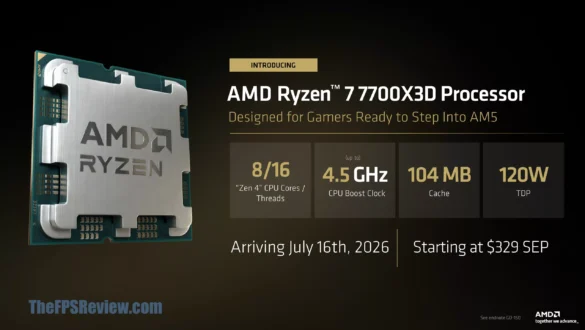
In choosing a CPU, you will probably find a difference in the TDP value between manufacturers like Intel and AMD. For example, the Intel Core i7-9700K CPU has a TDP of 95 watts, while the AMD Ryzen 7 3700X has a TDP of 65 watts. However, this does not mean that one CPU is better than another based on TDP only. You have to consider overall performance, power efficiency, and cooling requirements when making decisions.
Tips for managing TDP
- Optimize BIOS settings: Some motherboards allow you to set the power and cooling profiles in the BIOS, which can help manage TDP.
- Use quality thermal paste: Using high quality thermal paste between CPU/GPU and heatsink can improve cooling efficiency.
- Increase air flow: Adding an additional fan or using a casing with good ventilation can help reduce the temperature of the component.
- Periodically monitor the temperature: Use monitoring software to monitor CPU and GPU temperature periodically and make sure everything remains within safe limits.
FAQ about Thermal Design Power (TDP)
1. What is TDP? TDP, or thermal design power, is the maximum amount of heat generated by computer components that must be removed by the cooling system in maximum working conditions.
2. Why is TDP important? TDP is important because it determines the cooling requirements of components, ensures system stability, and helps in designing energy efficient systems.
3. How to calculate TDP? Calculating TDP is carried out by hardware manufacturers using various methods and estimates based on operating frequency, voltage, and circuit architecture.
4. What is the difference between standard TDP and Peak TDP? Standard TDP is the average TDP value under normal workload, while Peak TDP is the maximum amount of heat generated under extreme workload.
5. How to select components based on TDP? Choose a component with a TDP that suits your needs and make sure the cooling system is adequate to handle the heat generated.
By understanding TDP and how to manage it, you can ensure that your computer system operates stably and efficiently, both for daily use, gaming, and heavy work. Always check the component specifications and make sure the cooling system is appropriate to maintain optimal performance and prevent overheating.