Get to know Melcoinda, ITRON, Hexing, Star, Cannet, and more Electric Meter Codes

Technological advances in the electricity sector bring various innovations that facilitate the management of energy use, one of which is a smart electricity meter. This meter not only makes it easier to record energy consumption but also supports an energy-efficient lifestyle. Various brands of electric meters such as Melcoinda, Itron, Hexing, Star, and Cannet have unique characteristics, including special codes used for various functions. This article will review in depth the electricity meter code of various brands, ranging from the Melcoinda Electric Meter Code, Itron, Hexing, Star, Cannet, and others, as well as providing comprehensive tips and guidelines for users.
What is the power meter code?
The electric meter code is a series of numbers or symbols used to access certain functions on the electricity meter. This code is usually used for:
- Checking the remaining balance of prepaid electricity.
- Check monthly electricity usage.
- Overcoming technical problems on the meter.
- Perform reset or reset.
- Enable additional features such as energy saving mode or other settings.
These codes can be inputted via a button or touch screen available on a smart power meter. An understanding of this code allows users to be more independent in managing the use of electrical energy.
The Importance of Understanding the Electric Meter Code
For prepaid electricity users, understanding the meter code is very important because it can help in:
- Usage efficiency: With the right code, users can monitor electricity consumption in real-time and control usage as needed.
- Problem solving: When there is a technical problem, the user can directly handle the problem without having to wait for the technician.
- Time and cost savings: Knowledge of the function of the code prevents delays in dealing with technical issues, which ultimately saves maintenance costs.
In addition, understanding the power meter code also helps maintain device performance and optimize its functions.
how to use electric meter code
Here are the steps to use the power meter code correctly:
- Enter code: Press the button on the power meter according to the desired code. Make sure the code is entered completely and correctly.
- Press ENTER: Once the code is entered, press the “Enter” or “OK” key to start the process.
- Follow the instructions: If the meter displays a message, follow the instructions on the screen. Usually, the screen will show the status or results of the function of the code.
- Complete the process: Make sure the process is complete before leaving the meter. Do not turn off the meter during the process.
List of Electric Meter Codes by Brand
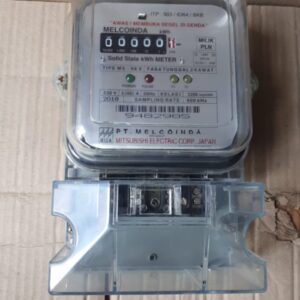

1. Melcoinda Electric Meter Code
| Code | Function |
|---|---|
| 00 | Reset the electricity meter |
| 01 | Check the relay function |
| 02 | Test display, buzzer |
| 03 | Check the remaining kWh |
| 04 | Display Revised Key Number and Type |
| 05 | Tariff Index (Index Tariff Display) |
| 06 | token reader test device |
| 07 | power limit |
| 08 | Tamper status display |
| 09 | power used |
| 10 | Display software version |
| 11 | unbalance line display |
| 37 | Remaining Credit (kWh) |
| 38 | Cumulative energy (kWh) |
| 39 | power factor |
| 40 | Power (wattage) |
| 41 | RMS voltage (V) |
| 44 | RMS current (A) |
| 47 | Momentary Power (W) |
| 53 | Total number of tokens received |
| 54 | Last accepted token code |
| 55 | The last 2 token codes received |
| 56 | 3 Last Token Code Received |
| 57 | 4 last accepted token code |
| 58 | 5 Last Accepted Token Code |
| 59 | Last kwh |
| 60 | 2 last token code (kWh) |
| 61 | 3 last token code (kWh) |
| 62 | 4 last token code (kWh) |
| 63 | 5 Last Token Code (kWh) |
| 64 | Total Technician Tokens Received |
| 65 | The last technique token is accepted |
| 66 | 2 technician tokens accepted |
| 67 | 3 Technician Tokens Accepted |
| 68 | the number of trips due to more load |
| 69 | Number of power outages |
| 70 | Total Terminal Cover Open |
| 71 | Total Cover Meter Opened |
| 72 | Total tampering |
| 73 | negative energy used |
| 74 | Hardware version |
| 75 | No. id meter |
| 76 | meter constant |
| 77 | Supply Group Code (SGC) |
| 78 | Alarm duration |
| 79 | Alarm credit limit |
| 81 | Forecast Time Till The Credit Is Over |
| 82 | Last Tamper |
| 83 | last month’s energy consumption |
| 84 | Energy used for the last 2 months |
| 85 | Energy consumption for the last 3 months |
| 86 | Last Overload Trip (day and time) |
| 87 | 2 times the last trip over load |
| 88 | Last meter off (day and time) |
| 89 | 2 times the last meter off |
| 90 | The last time the terminal was opened |
| 91 | 2 times the last open meter terminal |
| 92 | The last time the terminal cover was opened |
| 93 | Maximum load of the month |
| 94 | peak load time of the month |
| 95 | Hours now |
| 96 | current date |
| 99 | Check Software and Features |
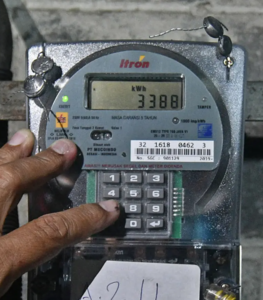

2. ITRON Electric Meter Code & Cannet
| Code | Function |
|---|---|
| 00 | restart the meter |
| 03 | Knowing the total kWh of electricity for last use |
| 07 | see the kWh limit |
| 09 | see the use of electrical power |
| 41 | see electric voltage |
| 44 | see the ampere number |
| 47 | Knowing the total power used |
| 54 | see the last electricity token code used |
| 59 | find out the last kwh total filled |
| 69 | see the counter the total number of power outages |
| 75 | Checking Prepaid PLN Electricity Meter ID |
| 79 | Check the minimum time limit for the appearance of the alarm |
| 456xx | Change the minimum alarm limit |
| 78 | Check the alarm delay in minutes |
| 123xx | Change the alarm delay |
| 90 | Turn off the LED light |
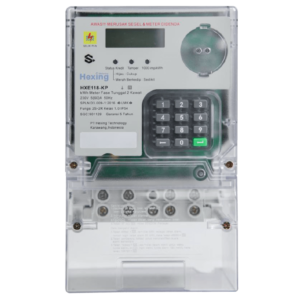

3. Hexing Electric Meter Code
| Code | Function |
|---|---|
| 800 | Restart meter (if there is a cancel) |
| 801 | Check the remaining kWh |
| 804 | Check Prepaid PLN ID Meter |
| 807 | Electrical voltage |
| 808 | Ampere being used |
| 809 | Counter Number of Times Dead |
| 812 | turn off the kwh limit alarm |
| 814 | Power being used |
| 815 | Last charging date |
| 817 | Number of kWh last charging |
| 851 | total kWh of electricity that has been past |
| 852 | Last token code |
4. STAR ELECTRICITY METER CODE
| Code | Function |
|---|---|
| 01 | see the total KWH that has been used |
| 02 | Knowing the maximum power used |
| 03 | Maximum power attainment time |
| 04 | Knowing the size of the voltage (volt) |
| 05 | Identify the size of the electric current (amperes) |
| 06 | Accumulated Kwh Purchase Total |
| 07 | Remaining Accumulated Power (kWh) |
| 08 | Estimated power-out time |
| 12 | Remaining Power Limit Warning Number |
| 13 | Set the power limiter |
| 18-30 | power for 1-12 months |
| 37 | warning sound duration |
| 38 | Use when the contactor is broken |
| 39 | RTC crystal accuracy |
| 41-45 | Cover Meter Time Opened |
| 46 | Accumulated Trip Overload |
| 65 | see id meter |
| 76-80 | Last 20 Digit Tokens |
| 82 | Tariff Index |
5. Conlog Electric Meter Code
| Code | Function |
|---|---|
| #1# | Average power usage |
| #2# | Total use of the last kwh |
| #6# | Total Kwh Token Last |
| #11# | Last token code |
6. Glomet Electric Meter Code
| Code | Function |
|---|---|
| 37 | Total remaining kWh |
| 38 | The number of kWh that has been used |
| 41 | Electrical voltage |
| 47 | power used |
| 54 | Last token code |
| 75 | PLN meter id |
| 79 | Minimum minute alarm |
Tips for Solving Electric Meter Code Problems
- Code not working: Make sure the code is entered correctly. Use the official guide provided by the meter brand.
- Electrical interference: If there is a disturbance, try turning off the meter for a few minutes before trying again.
- Contact Customer Service: If the problem remains unresolved, please contact the official customer service of your meter brand immediately for a solution.
Conclusion
Understanding the electricity meter code of various brands such as Melcoinda, Itron, Hexing, Star, and Cannet is very important for prepaid electricity users. In addition to assisting in monitoring energy consumption, this understanding also facilitates solving technical problems without the need for professional help. With this knowledge, users can optimize electricity usage and reduce the risk of interference. Make sure you always keep the meter code guide and keep updating the information as technology develops.