Google Adsense Solution: Your NIK Hasn’t Been Verified Against Data at DGT

Google Adsense is one of the online monetization platforms that is in great demand by content creators. However, some users in Indonesia may face obstacles when the “Your NIK has not been verified against the data in the DGT (Directorate General of Taxes)” appears. This article will discuss in depth the Google Adsense solution for this problem and ensure that your Google Adsense account runs smoothly without a hitch, accompanied by more comprehensive tips and guidelines.
Why should the NIK be verified?
Since the implementation of the integration of tax data between Google Adsense and the Directorate General of Taxes (DGT), all users in Indonesia are required to ensure that their NIK (Population Identification Number) and NPWP (Taxpayer Identification Number) data are appropriate. This policy is a step taken to comply with the tax regulations that apply in Indonesia, while at the same time ensuring that any income earned from Adsense is reported transparently.
A red notification related to NIK verification can occur if the data you enter in Adsense does not match the data recorded in DGT. This problem can arise due to incorrect data entry or NPWP status that is not active. Here are the detailed steps to solve it.
How to Overcome “Your NIK Is Not Verified” Notification
1. Make sure your NIK and Tax Number are integrated
The first step is to make sure that your NIK data is connected to your NPWP. DGT has updated the system so that every taxpayer must have an NPWP that is integrated with the NIK. This integration process is known as NPWP16, where the 16 digit NIK is used as a substitute for the old NPWP number.
- How to check the integration of NIK and NPWP:
- Open the official DGT website at https://ereg.pajak.go.id/ceknpwp.
- Enter the NIK and the requested data.
- If your NPWP status appears as “Non-Effective (NE)”, proceed to the next step.
#atfp_close_translate_span#

This integration is an important step to ensure your data is valid in the DGT system. If it’s not integrated yet, the Google Adsense system can’t verify your data, causing a red notification.
2. Activate your NPWP status
The status of the “Non-Effective” NPWP means that your data is not fully active in the DGT system. This condition often occurs in NPWP that has not been used for a long time or has never reported taxes. To overcome this, you can activate it with two methods:


a. Activation through the Tax Office
Visit the nearest tax office with supporting documents such as:
- Original ID card
- Old NPWP (if any)
- Statement Letter Regarding Activation of NPWP
The tax officer will check your data and activate your NPWP status directly on the spot. This process usually takes only a few hours.
b. activation via live chat on the djp site
If you don’t have time to come directly to the tax office, the online activation option can be a solution. You can take advantage of the Live Chat feature on the official DGT website:
- Go to https://pajak.go.id.
- Click the Live Chat feature in the lower right corner of the page.
- Submit a request for your NPWP activation by providing the required data.
#atfp_close_translate_span#

This process may take longer if you call during peak hours, but still efficient if you are not physically present.
3. Change Tax Information on Google Adsense
After making sure that your NIK and NPWP data is integrated, the next step is to update the tax information in your Google Adsense account. This step is important to synchronize the data in Adsense with the data in DGT. Here’s a Google Adsense solution for red notifications of tax data.
Guide to changing tax information on Google Adsense:
- Login to your Adsense account
- Log in to the Google Adsense dashboard using your account. Make sure you are on the main menu.
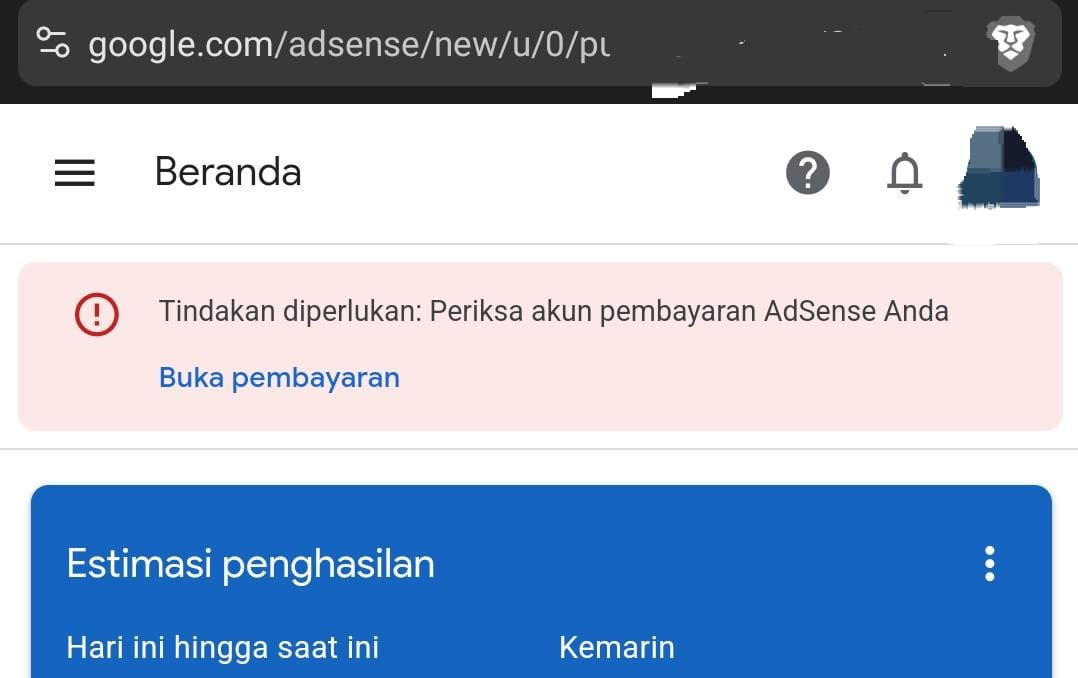
- Log in to the Google Adsense dashboard using your account. Make sure you are on the main menu.
- go to the payment section
- Click the “Payment” tab and select the “Manage payment settings” option.
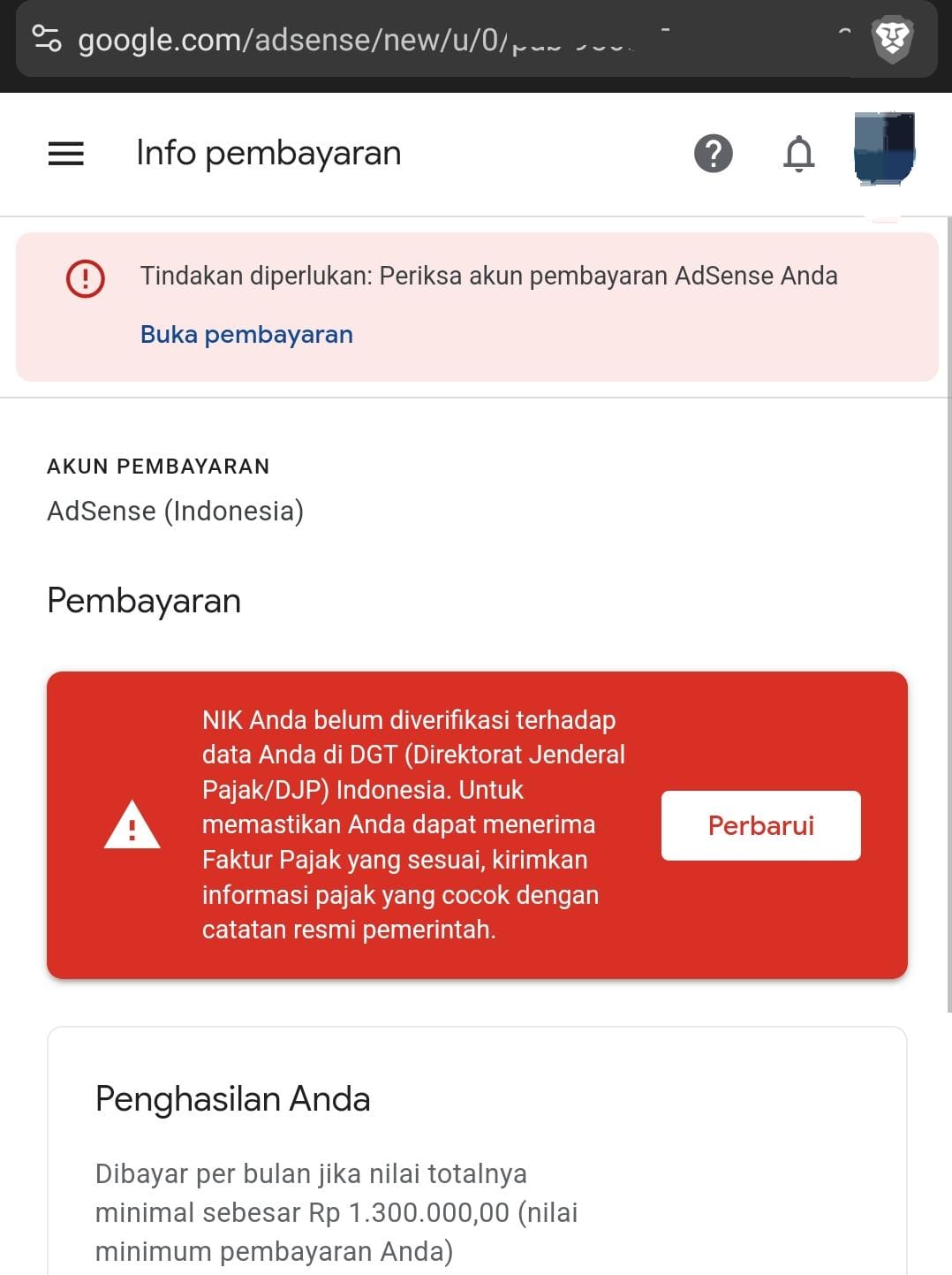
- Click the “Payment” tab and select the “Manage payment settings” option.
- Change tax information
- Enter a random identity first as a temporary substitute (e.g. a fake tax number).
- Save the changes and wait for a confirmation email from Google Adsense that the tax information has been updated.
- Return to original data
- After receiving the confirmation email, you can revert the tax information back to your original data (NIK and valid NPWP).


IMPORTANT NOTE: This change in tax information usually takes about 24 hours to update the notification status in AdSense.
4. Make sure the red notification is missing
After all the steps above are completed, a red notification related to NIK verification will usually disappear within 24 hours. However, if the notification still appears, re-check the data you entered. The slightest error can cause verification to fail.
Comparison Table of How to Activate NPWP
| Method | Excellence | Deficiency |
|---|---|---|
| Direct Tax Office | fast, it’s done right then and there | requires time and energy |
| live chat on djp site | easy, can be done from home | Response can be slower during rush hour |
The table above can help you choose the method that best suits your situation to enable inactive NPWP.
Tips to avoid similar problems
To prevent the problem of “your NIK not being verified” happening again in the future, here are some tips you can follow:
- Update data regularly
- Make sure the data on your ID card, NPWP, and Google Adsense are always updated if there are changes such as changing addresses or changing job statuses.
- Save important documents
- Keep digital and physical copies of important documents such as ID cards, NPWP, and tax certificates in a safe place.
- Obey the tax rules
- Make sure you report your Adsense income through the Annual Notice (SPT) to avoid legal problems and administrative sanctions from the DGT.
- Check notifications regularly
- Check the notifications on the Google Adsense dashboard often to make sure there are no sudden problems.
Google Adsense Solution for Red Notifications Tax Data
The problem of “your NIK has not been verified against the data in DGT” can be overcome with systematic steps, such as ensuring the integration of NIK and NPWP data, enabling NPWP status if needed, and updating tax information on Google Adsense. By following the guidelines described, you can remove red notifications in no time and resume unhindered monetization activities.
Always make sure your data is up-to-date and in accordance with applicable regulations. Thus, you can not only avoid technical problems but also ensure compliance with tax regulations in Indonesia. Hopefully this article helps you solve Google Adsense and Tax related problems more easily and efficiently!