7 Great AI features on the Galaxy S26 Ultra, including call filtering

Samsung Galaxy S26 Ultra: Smarter and more easy to use AI devices
Samsung Electronics Co., Ltd. It has officially launched the Galaxy S26 Ultra, which offers a number of significant improvements in artificial intelligence (AI)-based features. At the launch event in Jakarta, MX Product Marketing Senior Manager of Samsung Electronics Indonesia, Ilham Indrawan, explained that this update is designed to make it easier for users in various everyday situations, ranging from protection against suspicious calls to more sophisticated image editing capabilities.
According to him, the Galaxy S26 Ultra is nicknamed “The Next AI Phone” because this device is able to understand user needs without the need for manual intervention. “There’s no need to do anything, he can find the information or can simulate something,” he said.
The following are some of the main AI features present on the Galaxy S26 Ultra:
1. Call Screening
The Galaxy S26 Ultra is equipped with a call screening feature that helps users filter spam calls while recognizing important calls from unknown numbers. When this feature is active, the Galaxy AI will answer the call first. AI will then ask about the identity and purpose of the caller, and the conversation between AI and the caller is displayed in the form of a transcript on the screen. Users can find out important information before deciding to accept or reject a call. However, this feature is only available in English.
2. Now Nudge
Now Nudge is able to read the context of the notification or the last message, then provide relevant recommendations without the need to manually search for it by the user. For example, when there is a message asking for a photo of a pet cat, when the user wants to reply, the system will display the “Share Photos” suggestion and immediately open the gallery containing photos of the cat selected automatically based on the location tag or object in the image.
In another example, if someone asks for time availability on February 25 at 17:00, Now Nudge can check the schedule on the calendar and notify if there is a collision of the agenda. The keyboard will also display the “View Calendar” option so that users can immediately ensure the availability of time.
3. Circle to search
The ability of Google Circle to Search on the Galaxy S26 is also updated. If previously AI only recognized the circled or marked objects, now the device is able to understand all the elements that appear on the screen.
4. Bixby
Samsung also upgraded Bixby’s AI agent by focusing on optimizing device performance. Users can set the performance of the phone using everyday conversational language without the need for technical terms. For example, when the phone feels hot, the user can immediately ask questions and the system will search for the cause and make automatic adjustments to overcome the problem.


5. Creative Studio
The Creative Studio feature allows users to process photos or enter text prompts to produce various images such as stickers or greeting cards. Users can also add more personal and detailed descriptions to get more specific results. For example, making Eid greeting cards using edited self-portraits into animation.
6. Photo Assist
Photo Assist now comes with improvement through the support of Natural Language Editing. Users can edit photos only with commands in everyday language, including Indonesian. Users can describe the desired changes and the system will process them automatically. For example, when photographing a cake that has already been eaten, the user can type a command such as, “Make this cake whole again,” and the image will display the cake intact.
Another example, when shooting unfinished puzzles, users can request AI to complete it. As a result, the photo will display a puzzle that has been installed intact with details that still resemble the original puzzle, not turning into an ordinary image.
7. Super-steady horizontal lock
Samsung has previously presented the super-steady feature to the previous generation. In the Galaxy S26 series, this feature is now available in two options, namely standard supersteady and supersteady with horizontal lock support. Mode with Horizontal Lock is designed to maintain image stability in various conditions. Even when the device is rotated or moving very fast, the resulting video remains stable and locked in horizontal orientation.
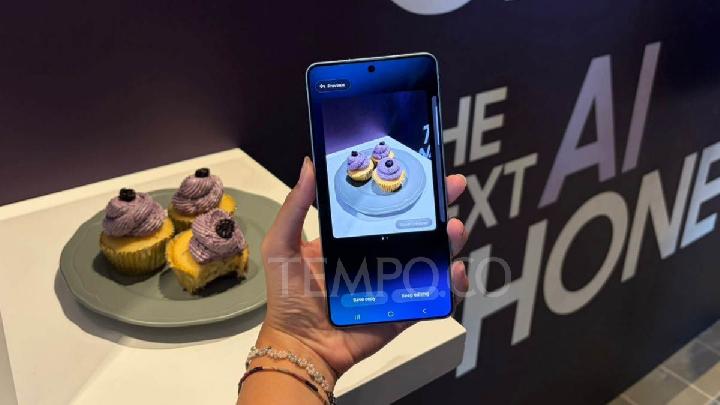
The newly released Samsung Galaxy S26 Ultra display, February 26, 2026. Tempo/Defara